$7.00Original price was: $7.00.$5.60Current price is: $5.60.
This winter will be so fun with the Snow Globe digital glyph and digital animation projects in one bundle! You can use both projects with the same students or have students do the digital glyph the first year and then the digital animation the next year. Ideal for computer lab teachers or upper elementary classroom teachers.
Students color 5 worksheets with icons that represent the different web browser icons (like home, favorites, search, close, menu, etc). Perfect for an offline activity!
Students learn the icons that are common in directional coding activities and then commit them to memory with a coloring page. Perfect for an offline activity!
Teach students how to follow and decompose algorithms with these Build a Monster digital activities. 2 types of digital activities ask students to follow an algorithm to put a Monster together and then look at a pre-built Monster and type their own algorithm for it.
Introduce a lesson on computers parts with this eBook that goes over the inputs and outputs of a computer. Great for a warm up activity in the computer lab or classroom. Share the PDF with students for a paperless experience or print the nonfiction text out as a booklet.
Learning keyboarding can be super boring and tedious for students. This set of 4 Summer Themed text formatting activities aims to bring engagement and a sense of purpose to the practice of typing. Students will also (hopefully) have a sense of pride over the final outcome and an understanding of the learning objective.
Students learn the icons that they will use in a word processing program and then commit them to memory with a coloring page. Perfect for an offline activity!
Teach students how to follow and decompose algorithms with these Build a Pizza digital activities. 2 types of digital activities ask students to follow an algorithm to put a Pizza together and then look at a pre-built Pizza and type their own algorithm for it.
Use these activities as a lesson on understanding what an algorithm is, how to write one, follow one, and decompose one. I even included printable posters and vocabulary cards.
Students are going to love creating their own Digital Glyph Valentine’s Day Scene and you’re going to love all of the technology skills work they are getting. This resource works on so many great technology skills. While students may be familiar with paper and pencil glyph activities, it takes it to a whole new level to do it digitally.
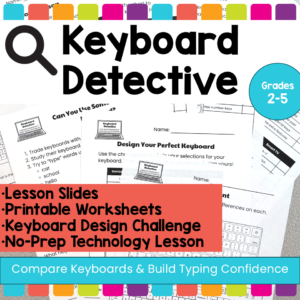
Help students build keyboard confidence with these no-prep keyboard activities that teach them to compare different keyboards, recognize the QWERTY layout, and understand how typing skills transfer across devices.
In this elementary technology lesson, students become Keyboard Detectives as they examine different types of keyboards, look for similarities and differences, and learn that keyboards may look different across laptops, desktops, Chromebooks, iPads, phones, and Smart TVs, but the important parts often stay in familiar places.
This resource is perfect for helping students understand that they do not have to relearn typing every time they use a new device. The lesson focuses on comparing keyboards, identifying key features, and building confidence with unfamiliar keyboard designs. The included teacher lesson plan is designed for 2nd–5th grade and includes student goals such as comparing keyboards, identifying similarities and differences, and using typing skills across devices.
$11.00Original price was: $11.00.$8.50Current price is: $8.50.
STEM goes digital with these fun and engaging design challenges. 10 websites and 90 challenges perfect for grades 2 and up. The virtual manipulatives work on any device and in any browser so this activity is perfect for distance learning and in the classroom.
Teachers looking to integrate technology skills and content areas with love this review of PowerPoint/Google Slides skills for students with the topic of Christmas Around the World. While this is a simple research project, the real goal of this activity is for students to put their notes into a Presentation template (using either Google Slides or PowerPoint) and make it look professional.
Using technology and problem solving skills, students decipher codes and complete activities to learn the Online Research Skills topic of Avoiding Plagiarism. The activities are housed in a Google Slides file and students enter their codes into a locked Google Form.
Introduce a lesson on how email works with this eBook that goes over what email is, how it compares to traditional main, and how we send and receive email messages. Includes brief email etiquette. Great for a warm up activity in the computer lab or classroom. Share the PDF with students for a paperless experience or print the nonfiction text out as a booklet.
This resource works on so many great technology skills. While students may be familiar with using snap cubes (or counting blocks or whatever you call them) to make designs, it brings the skill to a whole new level to do it digitally. 10 Valentine’s Day designs in 4 different levels for differentiation between grade levels k-5.
Introduce a lesson on keyboarding with this eBook that goes over how a keyboard works and how we use them, including an introduction to Home Row keys and learning to type. Great for a warm up activity in the computer lab or classroom. Share the PDF with students for a paperless experience or print the nonfiction text out as a booklet.
$73.00Original price was: $73.00.$65.70Current price is: $65.70.
Do you need your students to master Google Slides, Google Docs, Google Sheets, and Google Classroom so that they can complete assignments efficiently? This bundle has everything your upper elementary students need to become pros at Google Apps.
If you’re looking for an engaging end of year activity for your upper elementary students, try this End of Year Memory Book Digital Activity! 18 Digital activity slides for Google Slides or PowerPoint that students fill in with their answers.
$36.00Original price was: $36.00.$25.20Current price is: $25.20.
Coding meets vocabulary instruction with VoCode! Integrate those robots you have (or turn students into robots) to complete these coding challenges. 3 Options for the activities mean that you can use this with ANY movable Bots and ANY grade level of students. Be sure to check out the images!
This resource works on so many great technology skills. While students may be familiar with using snap cubes (or counting blocks or whatever you call them) to make designs, it brings the skill to a whole new level to do it digitally. 10 Construction Theme designs in 4 different levels for differentiation between grade levels k-5.
$22.00Original price was: $22.00.$20.00Current price is: $20.00.
This complete unit has 10 reading passages, vocab cards, a multiple choice assessment, and 40 digital activity slides for internet safety and digital citizenship topics. It is ideal for computer lab teachers to use during tech class as you can choose which topics to complete with each grade level.
Coding meets vocabulary instruction with VoCode! Integrate those robots you have (or turn students into robots) to complete these coding challenges. 3 Options for the activities mean that you can use this with ANY movable Bots and ANY grade level of students. Be sure to check out the preview!
This set includes Parts Inside a Computer. Check out page 5 of the preview to see which ones are included.
Learn the keyboard keys while practicing technology vocabulary terms with this typing program. Over 200 vocabulary terms are included, as well as a video of directions for how to use your own lists. There are 13 Google Slides files which split the words into groups of 20. . There are 4 practice slides for each word.
Using technology and problem solving skills, students decipher codes and complete activities to learn the Online Research Skills topic of Evaluating a Web Page. The activities are housed in a Google Slides file and students enter their codes into a locked Google Form.
Students put together a digital computer in 4 click and drag activities. They learn how to put icons on a desktop, where the hardware components go inside of a computer, they label the browser icons, and they put a keyboard together. There are differentiated options to meet the needs of your students.
This activity is provided in PowerPoint. You can upload it into your Google Drive and it will open with Slides.
This complete unit has 9 reading passages, vocab cards, a multiple choice assessment, and 36 digital activity slides for online research topics. It is ideal for computer lab teachers to use during tech class as you can choose which topics to complete with each grade level.
$15.00Original price was: $15.00.$12.00Current price is: $12.00.
15 Word Processing modules for the Intermediate skills. Most appropriate for students in grades 3-5 or students who have had an introduction to Word Processing. For each skill, there are 2 templates. 1 will open in MS Word, and 1 will open in Google Docs. To use the Google Docs version, your students will need to have Google accounts. The tasks for the assignment are the same whether students are using Word or Docs.
These projects were made out of a desire to guide students to eventually work independently in software programs. They are design to build technology literacy through repetition and engaging project prompts.
Students are going to love discovering what Thanksgiving themed design is hidden in the spreadsheet software mystery pictures and you’ll love that they are practicing so many different skills. While students may be familiar with paper and pencil mystery pictures, it takes it to a whole new level to do it digitally. Students will really master the toolbar in Google Sheets or Microsoft Excel. The activity has them filling 100 cells in the table per design, making it a mastery activity.
3 Halloween themed Keyboard shortcuts “games” that can be completed on any device. There are 12 keyboard shortcuts included and these 12 are repeated throughout the 3 games. This gives students an opportunity to master them. There is a 1 page poster included for you to use to introduce the keyboard shortcuts if your students are new to them.
Teach students how to follow and decompose algorithms with these Build a Burger digital activities. 2 types of digital activities ask students to follow an algorithm to put a Burger together and then look at a pre-built Burger and type their own algorithm for it.
Use these activities as a lesson on understanding what an algorithm is, how to write one, follow one, and decompose one. I even included printable posters and vocabulary cards.
Bring hands-on learning into your computer science and technology education with Coding Quests games. This board game practices If/Then/Else language while students move their Reindeer characters through a path filled with obstacles. Can they get their gifts delivered and make it back to the North Pole Safely on Christmas Night?
Watch your students master directional coding with these engaging Build a Character Digital Coding activities. It is also great keyboard shortcut practice! Perfect for the ISTE standard Computational Thinking and Computer Science Week. They would even be great for your STEM time in class or your Maker Space during the Hour of Code!
Directional coding is the foundation of learning to code. It builds the problem-solving skills students will need to transition into block coding and then actual coding languages.
By working on progressively harder challenges, students will get to practice the skill multiple times.
Coding meets vocabulary instruction with VoCode! Integrate those robots you have (or turn students into robots) to complete these coding challenges. 3 Options for the activities mean that you can use this with ANY movable Bots and ANY grade level of students. Be sure to check out the images!
$6.50Original price was: $6.50.$5.20Current price is: $5.20.
This holiday season will be so fun with the Ugly Sweater digital glyph and digital animation projects in one bundle! You can use both projects with the same students or have students do the digital glyph the first year and then the digital animation the next year. Ideal for computer lab teachers or upper elementary classroom teachers.
The clip art pieces can be used for many December events and holidays like Hanukkah, Kwanzaa, Christmas, Solstice, and New Year. You can add more customized options for your students if needed.
$34.00Original price was: $34.00.$27.20Current price is: $27.20.
180 I Can Statements for the 2016 ISTE Standards for Students. These are designed to match the Technology Themed Decor Classroom Set. Both portrait and landscape layouts are included as well as blank templates for you to make your own.
Introduce a lesson on computers with this eBook that goes over the history of computers from ancient computing devices to the first punch card systems all the way to modern computers with internet connections. Great for a warm up activity in the computer lab or classroom. Share the PDF with students for a paperless experience or print the nonfiction text out as a booklet.
Digital interactive slides for 4th and 5th grade students with a Back to School theme. Timely Tech is designed to help your students build tech skills while incorporating monthly themed digital activities.
When I teach my students with monthly themed activities that bring in the other subject areas, I find that they are more engaged and empowered to learn. There is intentionally lots of repetition from month to month with these Timely Tech activities because students are building both tech and academic skills.
This resource works on so many great technology skills. While students may be familiar with using snap cubes (or counting blocks or whatever you call them) to make designs, it brings the skill to a whole new level to do it digitally. 10 St. Patrick’s Day designs in 4 different levels for differentiation between grade levels k-5.
$33.00Original price was: $33.00.$26.40Current price is: $26.40.
Over 180 Posters of I Can Statements for the ISTE® Technology Standards for Students. Both full page and half page posters are included as well as PDF and PNG options for printing. This is the K-2 and 3-5 sets combined into one download for K-5.
Test Taking Vocabulary is such an important thing to review with students before the test. Use these digital question stems on your interactive whiteboard as a daily writing warm up, or as an individual project on laptops or tablets to help your students learn what is expected from each of these critical words.
Words included: Describe, Identify, Explain, Infer, Develop, Evaluate, Compare and Contrast, Justify, Outline, Summarize, Predict, Interpret, Evidence, Analyze, Define, Illustrate.
120 sight words and spelling words coded in Binary to give students a decoding challenge. They are broken up into 12 sets of 10 digital flash cards which students access via a clickable PDF to take them to the web pages. After each word, students click check to see if they got it right or wrong.
Try digital animation with your students with a simple and engaging Summer theme project! Students choose from background options and then add shapes, text, and clip art graphics to make a scene. Then they duplicate the slide and make a small change over and over (about 50 times) to animate the scene. Once the stop motion animation is complete students publish it to the web and can optionally make it into a GIF using a website tool.
Students can learn and memorize the Chromebook Special Keys by completing 10 engaging secret picture tile puzzles. These puzzles are great mouse or trackpad practice as well as being an opportunity to practice navigating a Google Slides or PowerPoint file.
Students are going to love discovering what Christmas themed design is hidden in the spreadsheet software mystery picture and you’ll love that they are practicing so many different skills. While students may be familiar with paper and pencil mystery pictures, it takes it to a whole new level to do it digitally. Students will really master the toolbar in Google Sheets or Microsoft Excel. The activity has them filling 100 cells in the table per design, making it a mastery activity.
$16.00Original price was: $16.00.$12.80Current price is: $12.80.
Learning keyboarding can be super boring and tedious for students. This set of Seasons Themed text formatting activities aims to bring engagement and a sense of purpose to the practice of typing. Students will also (hopefully) have a sense of pride over the final outcome and an understanding of the learning objective.