EdTech for STEM Education: Tools and Ideas for Elementary
STEM (science, technology, engineering and math) is all about asking questions, testing ideas and solving problems. Educational technology, or edtech, can make each part of STEM more hands-on: students can run an experiment that would be too dangerous or expensive in real life, design something in 3D or program a robot to test their thinking. Here’s what edtech for STEM education looks like in an elementary classroom, the tools worth knowing and how to get started.
What Is EdTech for STEM Education?
Edtech for STEM education means using digital tools so students can explore, build and test STEM ideas themselves. The best tools don’t just show students information. They let students do something: change a variable in a simulation, write code that moves a robot or design a part and print it.
The main types of edtech tools for STEM are:
- Simulations and virtual labs
- Virtual and augmented reality
- Coding platforms
- Robots and programmable devices
- 3D design and printing tools
- Digital math manipulatives and graphing tools
EdTech Tools for Science
Science simulations let students experiment without lab equipment. PhET Interactive Simulations from the University of Colorado Boulder are free and cover topics like circuits, states of matter and forces. I still remember the first time I watched students in VR and AR headsets stroll through ancient ruins and swim beside colorful fish in the deep ocean. Reading about marine biology is one thing, but getting to “live” it is something students don’t forget. Virtual reality can take students places a field trip can’t, like inside the human body or onto the ocean floor. For ideas, see my 7 fun science experiments using virtual reality and how to start implementing AR and VR in the classroom.
EdTech Tools for Technology and Coding
Coding is the “T” most elementary schools start with. ScratchJr works well for K-2 because students snap together picture blocks. Scratch and Code.org courses take grades 3-5 further into loops, events and conditionals. Even unplugged activities count: you can teach basic coding concepts without a single device.
EdTech Tools for Engineering
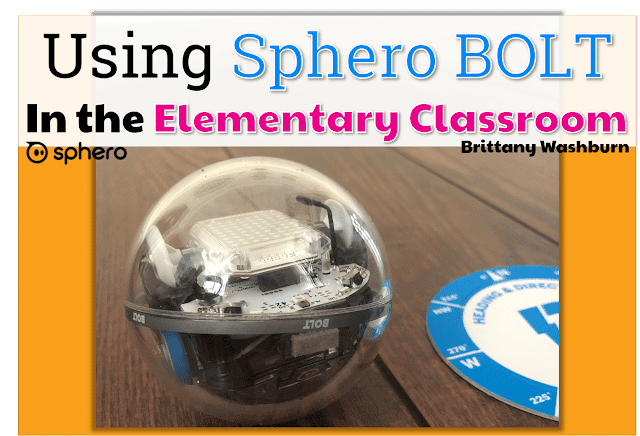
Engineering is about designing, testing and improving, and edtech makes that cycle faster. Robots like Bee-Bot, Ozobot, Sphero and LEGO Education kits let students program a design and immediately see whether it works. 3D design tools like Tinkercad and Makers Empire let students model an object and print it. Compare them in Makers Empire vs. Tinkercad, and see the best robotics kits for schools, by grade.
EdTech Tools for Math
Virtual manipulatives (digital base-ten blocks, fraction bars, geoboards) give every student their own set, with no bins to clean up. Graphing tools like Desmos help older students see patterns in data. Math also shows up in every other part of STEM: measuring in a 3D design, counting steps in a code sequence or graphing results from an experiment.
EdTech for STEM by Grade Level
| STEM area | Grades K-2 | Grades 3-5 |
|---|---|---|
| Science | Short simulations, VR field trips | Virtual labs that change one variable at a time |
| Technology | ScratchJr, unplugged coding | Scratch, Code.org courses |
| Engineering | Bee-Bot, Ozobot, simple build challenges | Sphero, LEGO kits, Tinkercad |
| Math | Virtual manipulatives | Graphing tools, data collection |
In my book, The Digital Classroom, I recommend keeping K-2 simple and visual: drag-and-drop apps, short projects and a quick story or cartoon to introduce an idea like coding. Grades 3-5 are ready for a bit more challenge, like a simple coding platform where they program a character to complete tasks, and a short video about how robots are used in everyday life makes a great hook.
How to Start Integrating EdTech into STEM
- Start with one unit. Pick a science or math unit you already teach and add one tool to it, rather than overhauling everything.
- Lead with the problem, not the tool. “Design a way to…” or “Program the robot to…” keeps the focus on thinking.
- Use the design process. Ask, imagine, plan, create, test and improve. Edtech makes the test-and-improve step quick.
- Teach the tech skills first. Students can’t focus on the science if they’re stuck on logging in or dragging blocks.
- Let students share. Short presentations or recordings of what worked (and what didn’t) build communication skills too.
These steps follow the iTECH model from my book, The Digital Classroom: Inspire, Try, Expand, Create and Huddle. Spark curiosity first, give students time to try the tool, build understanding together, let them create, then huddle to share their work and give each other feedback.
Free vs. Paid STEM EdTech
You can start with free tools: PhET simulations, Scratch, ScratchJr, Code.org, Tinkercad and many virtual manipulatives cost nothing. Robots, 3D printers and VR headsets cost money, so they’re worth sharing across classrooms or a makerspace.
FAQ: Are There EdTech Tools for STEM Education?
Yes, and many are free. The most useful edtech tools for STEM education are simulations (like PhET), coding platforms (like Scratch and Code.org), programmable robots (like Bee-Bot, Ozobot and Sphero), 3D design tools (like Tinkercad) and digital math manipulatives. Choose tools that let students do and test things, not just watch.
If you teach the tech skills these tools depend on, the K-5 Technology Curriculum covers them grade by grade so students are ready for STEM projects.