The Digitally Immersed Generation: Why Exposure Isn’t Enough
We used to call today’s students “digital natives.”
But that term doesn’t quite fit anymore.
What we’re actually seeing is something different — what I call The Digitally Immersed Generation.
These students have grown up surrounded by devices, apps, streaming platforms, search engines, and constant connectivity. They are immersed in digital environments daily. But immersion is not the same as instruction. Exposure is not the same as literacy. And comfort with technology does not automatically translate into digital readiness.
Scrolling is automatic.
Functioning is taught.
And that distinction matters more than ever.
What Writing My Book Helped Me See
When I wrote The Digital Classroom, I focused heavily on the iTECH model — on how students can use technology to innovate, create, expand ideas, and think critically.
But as I reflected on my classroom experience and listened to teachers implementing the model, I kept seeing the same pattern:
Students weren’t struggling with creativity.
They were struggling with infrastructure.
They didn’t know:
- How file systems actually worked
- How to organize digital work
- How search engines prioritize results
- How to evaluate credibility
- How to distinguish fact from opinion
- How to troubleshoot calmly when something went wrong
They were comfortable with platforms.
But they weren’t confident with systems.
And I realized something important:
I had named the transformation.
But I hadn’t fully named the prerequisite.
Before students can innovate with technology, they have to function within it.
That realization led to the creation of the READI Framework.
The Gap Between Immersion and Literacy
The Digitally Immersed Generation is comfortable navigating apps and platforms. But comfort is not competence.
Here’s what the gap looks like in real life:
- “Untitled 47” saved in the wrong folder
- Panic when a browser tab closes
- Clicking the first search result without reading
- Confusing opinion pieces with factual reporting
- Waiting for an adult to fix every technical issue
This is not a motivation problem.
It’s not laziness.
It’s not a character flaw.
It’s a missing structure problem.
We assumed immersion would build literacy.
It doesn’t.
Digital Literacy Includes Assessment Navigation
In schools, major assessments are administered through online platforms.
Students are expected to:
- Navigate multiple tabs and sections
- Use drag-and-drop tools
- Highlight and annotate digital passages
- Type extended responses
- Review and revise answers before submission
When these skills aren’t explicitly taught, students’ performance may reflect digital discomfort rather than academic understanding.
Teaching digital routines and independence ensures that assessment platforms measure content knowledge — not tech navigation ability.
The READI Framework: A Structured Approach to Digital Literacy
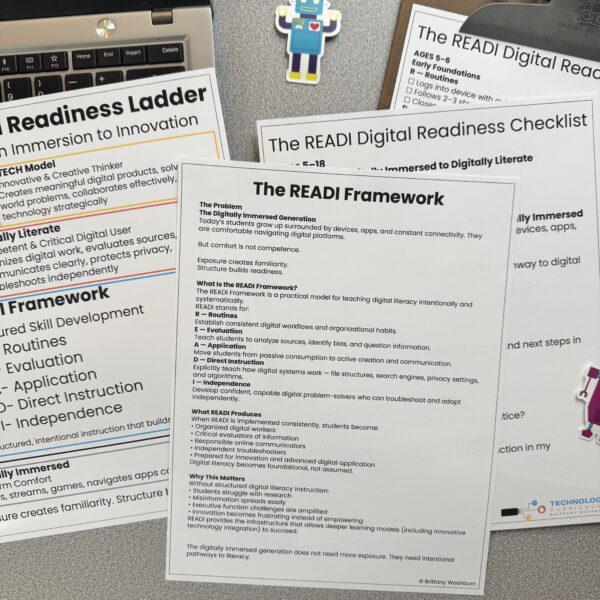
The READI Framework is a practical model for teaching digital literacy skills across grade levels. It moves students from digital immersion to digital independence.
READI stands for:
R — Routines
Building consistent digital workflows and organizational habits.
E — Evaluation
Teaching students how to analyze sources, identify bias, and question information online.
A — Application
Moving students from passive consumption to active creation and communication.
D — Direct Instruction
Explicitly teaching how digital systems work (file structures, search engines, algorithms, permissions).
I — Independence
Developing the confidence and problem-solving skills needed to navigate digital environments without constant adult intervention.
Digital literacy isn’t absorbed through screen time.
It’s built through structured instruction and practice.
Digital Literacy Milestones by Age (5–18)
Below is a simplified overview of digital readiness milestones aligned with the READI Framework.
Elementary School (Ages 5–10)
Students should learn:
- Basic device control (mouse, trackpad, keyboard)
- Logging in and navigating apps calmly
- Saving and opening documents intentionally
- Creating folders and renaming files
- Recognizing obvious ads
- Understanding that websites are created by people
This stage focuses heavily on Routines and Direct Instruction.
Upper Elementary & Middle School (Ages 9–14)
Students should be able to:
- Organize digital work independently
- Compare multiple online sources
- Distinguish fact from opinion
- Identify basic bias
- Manage shared documents
- Troubleshoot simple technical issues
- Navigates multi-page digital forms
- Types extended responses efficiently
At this stage, Evaluation and Independence increase.
High School (Ages 15–18)
Students should demonstrate:
- Professional digital communication
- Structured research with citations
- Awareness of digital footprint
- Recognition of phishing attempts
- Responsible password management
- Ability to complete real-world online tasks independently
By graduation, students should be digitally independent.
Why READI Comes Before iTECH
The iTECH model focuses on innovation — inspiring students to use technology creatively and meaningfully.
But innovation without infrastructure creates frustration.
Students cannot:
- Collaborate effectively
- Research deeply
- Create confidently
- Communicate professionally
Without digital routines, evaluation skills, and independence.
READI builds the readiness that allows iTECH to thrive.
READI is the foundation.
iTECH is the transformation.
This isn’t a pivot away from my work.
It’s a deeper articulation of it.
Frequently Asked Questions About Digital Literacy
What is digital literacy?
Digital literacy is the ability to use technology responsibly, effectively, and independently. It includes managing files, evaluating online information, communicating professionally, and understanding how digital systems work.
What are digital literacy skills for students?
Key digital literacy skills include:
- File organization
- Online research and source evaluation
- Bias recognition
- Professional email writing
- Password safety
- Troubleshooting common tech issues
At what age should students learn digital literacy?
Digital literacy begins in early elementary school with basic device control and digital routines. Skills expand through middle and high school to include research, evaluation, and digital independence.
Are today’s students digitally literate?
Today’s students are digitally immersed, meaning they are comfortable with technology. However, comfort does not equal competence. Digital literacy requires intentional instruction.
How can teachers teach digital literacy skills?
Teachers can use structured models like the READI Framework to explicitly teach digital routines, evaluation strategies, application tasks, and independence.
What This Means for Parents and Teachers
If we want digitally literate students, we have to teach the invisible skills.
For Parents:
- Let your child send the email.
- Practice checking shared digital calendars together.
- Ask, “Who created this?” when reading something online.
- Pause before solving tech problems for them.
For Teachers:
- Teach file systems explicitly.
- Model how to compare two sources.
- Build predictable digital workflow routines.
- Gradually release responsibility instead of rescuing immediately.
Immersion creates familiarity.
Instruction builds competence.
Practice builds confidence.
Reflection builds discernment.
Why Naming This Matters
Writing forces clarity.
Through reflection, I realized what many educators were already seeing: students weren’t failing because they lacked creativity. They were struggling because they lacked structure.
The READI Framework gives language to that missing layer.
The Digitally Immersed Generation does not need more exposure.
They need intentional pathways to literacy.
And when structure is in place…
Innovation becomes possible.
From Immersion to Readiness
The Digitally Immersed Generation does not need more screen time.
They need structure.
They need explicit instruction.
They need guided practice.
And when we intentionally build digital literacy skills through the READI Framework, students become digitally ready — prepared not just to consume technology, but to navigate it confidently and responsibly.
Download the printable checklists here: