

Technology Color By App Icons Printables
$3.00Students learn the icons that they will use on a tablet and then commit them to memory with a coloring page. Perfect for an offline activity!
Showing 49–96 of 383 resultsSorted by popularity

Students learn the icons that they will use on a tablet and then commit them to memory with a coloring page. Perfect for an offline activity!

30 Google Slides to practice using the mouse or trackpad. 10 slides of each theme (fall, winter, and spring) to use as review all school year long. Students Drag and Drop (click and drag) the icon across the dotted line and drop it in the designated spot. Can be done with a mouse or trackpad for practice at any age level and with any device.

Students use a POP It keyboard (or any available keyboard) and the provided work mat and task cards as a station activity. There are 6 sets of task cards included so you can keep using this as students age. Prep once and use forever!

Students color 5 worksheets with icons that represent the different web browser icons (like home, favorites, search, close, menu, etc). Perfect for an offline activity!

Excel Skills for Beginners. Do you need your students to master the basics of Microsoft Excel so that they can use it independently? This set of lessons will get them there.

Digital interactive slides for grades K-1 students with a October theme. Timely Tech is designed to help your students build tech skills while incorporating monthly themed digital activities.
When I teach my students with monthly themed activities that bring in the other subject areas, I find that they are more engaged and empowered to learn. There is intentionally lots of repetition from month to month with these Timely Tech activities because students are building both tech and academic skills.

Help your students learn the parts of a desktop and laptop computer with guided instruction and independent click and drag activities. By the end of the lesson students will be able to label the screen, keyboard, processor, trackpad or mouse, headphones, and speakers. They will also be able to compare and contrast a laptop and desktop computer. The best part is that these activities are paperless. They are made for Google Drive and can also be use with Microsoft OneDrive (directions in file). Any device that can access Google Slides can be used to complete these digital interactive activities.

Introduce a lesson on computers with this eBook that goes over 12 parts of a computer, including both outside and inside components. Great for a warm up activity in the computer lab or classroom. Share the PDF with students for a paperless experience or print the nonfiction text out as a booklet.

Coloring pages for technology class where students fill in sections of the picture based on the Retro Tech key. Perfect for an offline activity!

Digital interactive slides for grades K-1 students with a December theme. Timely Tech is designed to help your students build tech skills while incorporating monthly themed digital activities.
When I teach my students with monthly themed activities that bring in the other subject areas, I find that they are more engaged and empowered to learn. There is intentionally lots of repetition from month to month with these Timely Tech activities because students are building both tech and academic skills.

Sorting Matrix Digital Activities to teach If/Then/Else coding language (Conditionals). Everything you need to teach students about conditionals and let them practice using the terminology. This resource includes 12 digital slides with moveable pieces that works in Google Slides or PowerPoint. This set has fine motor building materials including building blocks, play dough, pattern blocks, and counters – without the mess!

Do you need your students to be mouse or trackpad masters but don’t have time to plan the lessons? These 10 lessons progress through moving the mouse, clicking on things, click and drag, and double click.

15 digital interactive slides for grades K-1 students with a November theme. Timely Tech is designed to help your students build tech skills while incorporating monthly themed digital activities.
When I teach my students with monthly themed activities that bring in the other subject areas, I find that they are more engaged and empowered to learn.

Digital interactive slides for grades K-1 students with a Back to School theme. Timely Tech is designed to help your students build tech skills while incorporating monthly themed digital activities.
When I teach my students with monthly themed activities that bring in the other subject areas, I find that they are more engaged and empowered to learn. There is intentionally lots of repetition from month to month with these Timely Tech activities because students are building both tech and academic skills.

Students are going to love discovering what Christmas themed design is hidden in the hundreds chart mystery picture and you’ll love that they are practicing so many different skills. While students may be familiar with paper and pencil hundreds charts, it takes it to a whole new level to do it digitally. Students will really master the toolbar in whatever program you use. The activity has them filling 100 cells in a table per design, making it a mastery activity.

This resource works on so many great technology skills. While students may be familiar with using snap cubes (or counting blocks or whatever you call them) to make designs, it brings the skill to a whole new level to do it digitally. 10 Valentine’s Day designs in 4 different levels for differentiation between grade levels k-5.

Digital interactive slides for grades K-1 students with a May theme. Timely Tech is designed to help your students build tech skills while incorporating monthly themed digital activities.
When I teach my students with monthly themed activities that bring in the other subject areas, I find that they are more engaged and empowered to learn. There is intentionally lots of repetition from month to month with these Timely Tech activities because students are building both tech and academic skills.

Students can practice matching upper and lowercase letters by completing 4 sets of 10 engaging digital secret picture tile puzzles. These puzzles are great mouse or trackpad practice as well as being an opportunity to practice navigating a Google Slides or PowerPoint file.
4 Themes Included:

Coding meets vocabulary instruction with VoCode! Integrate those robots you have (or turn students into robots) to complete these coding challenges. 3 Options for the activities mean that you can use this with ANY movable Bots and ANY grade level of students. Be sure to check out the images!

This resource works on so many great technology skills. While students may be familiar with using snap cubes (or counting blocks or whatever you call them) to make designs, it brings the skill to a whole new level to do it digitally. 10 Construction Theme designs in 4 different levels for differentiation between grade levels k-5.

Coding meets vocabulary instruction with VoCode! Integrate those robots you have (or turn students into robots) to complete these coding challenges. 3 Options for the activities mean that you can use this with ANY movable Bots and ANY grade level of students. Be sure to check out the preview!
This set includes Parts Inside a Computer. Check out page 5 of the preview to see which ones are included.

Students put together a digital computer in 4 click and drag activities. They learn how to put icons on a desktop, where the hardware components go inside of a computer, they label the browser icons, and they put a keyboard together. There are differentiated options to meet the needs of your students.
This activity is provided in PowerPoint. You can upload it into your Google Drive and it will open with Slides.

Students are going to love discovering what Thanksgiving themed design is hidden in the spreadsheet software mystery pictures and you’ll love that they are practicing so many different skills. While students may be familiar with paper and pencil mystery pictures, it takes it to a whole new level to do it digitally. Students will really master the toolbar in Google Sheets or Microsoft Excel. The activity has them filling 100 cells in the table per design, making it a mastery activity.

Fall themed activities for primary students. These activities are paperless and engaging! There are so many ways to use these activities that they will become a staple in your classroom.
-Use as a whole class activity on an interactive whiteboard
-Use as your computer station and watch students go through the activities independently!
-Use as an activity during your computer lab time

Learn the keyboard keys while practicing sight words with this typing program. 342 common sight words are included, as well as a video of directions for how to use your own lists. There are 14 Google Slides files which split the words into groups of 25. These are perfect for any students grades PreK-3rd or older students who are still working on the Dolch sight words list. There are 3 practice slides for each word. I consider this a mastery activity, meaning that there are no wrong answers because students keep working until they are correct.

In my weekly visual plans that I send out there are back up plans listed every time. This is a bundle of almost all of those back up plans.
Want the weekly visual plans sent to you? Click here to get them.

Coding meets vocabulary instruction with VoCode! Integrate those robots you have (or turn students into robots) to complete these coding challenges. 3 Options for the activities mean that you can use this with ANY movable Bots and ANY grade level of students. Be sure to check out the images!

Students can practice both academic and technology skills together with the right activities. These Halloween theme digital phonics activities work in Google Slides or as an interactive PowerPoint on any type of device that has these programs. There are 24 Halloween themed activity slides to help them practice click and drag and basic typing skills. Students will also navigate between slides in the software program.

Digital interactive slides for grades K-1 students with a January theme. Timely Tech is designed to help your students build tech skills while incorporating monthly themed digital activities.
When I teach my students with monthly themed activities that bring in the other subject areas, I find that they are more engaged and empowered to learn. There is intentionally lots of repetition from month to month with these Timely Tech activities because students are building both tech and academic skills.

180 I Can Statements for the 2016 ISTE Standards for Students. These are designed to match the Technology Themed Decor Classroom Set. Both portrait and landscape layouts are included as well as blank templates for you to make your own.

PowerPoint Skills for Beginners Version 2. Do your students need help with adding slides, changing their layouts, working with text boxes, adding pictures, and changing the slide designs? This resource will expose them to these features in PowerPoint and give them an opportunity to practice each skill in a fun and creative way.

This resource works on so many great technology skills. While students may be familiar with using snap cubes (or counting blocks or whatever you call them) to make designs, it brings the skill to a whole new level to do it digitally. 10 St. Patrick’s Day designs in 4 different levels for differentiation between grade levels k-5.

Over 180 Posters of I Can Statements for the ISTE® Technology Standards for Students. Both full page and half page posters are included as well as PDF and PNG options for printing. This is the K-2 and 3-5 sets combined into one download for K-5.

Typing simple sentences makes great keyboarding practice for primary students. This is a set of 40 slides, each containing a short sentence for students to type. Any device that can access Google Slides or PowerPoint can be used to complete these digital interactive activities.

Students are going to love building their own Digital Characters and you’re going to love all of the technology skills work they are getting. Digital Glyphs work on so many great technology skills. While students may be familiar with paper and pencil glyph activities, it takes it to a whole new level to do it digitally.
In this Build a Character activity, students will be asked to work across slides in either Google Slides or PowerPoint, copy and paste between slides, resize pieces, layer pieces, group pieces, and save their finished work as an image file. All while completing an engaging get-to-know-you activity.
This Build a Character set is a beginner digital glyph activity. It is designed for primary grades students.

Students are going to love discovering what Christmas themed design is hidden in the spreadsheet software mystery picture and you’ll love that they are practicing so many different skills. While students may be familiar with paper and pencil mystery pictures, it takes it to a whole new level to do it digitally. Students will really master the toolbar in Google Sheets or Microsoft Excel. The activity has them filling 100 cells in the table per design, making it a mastery activity.

Thanksgiving Digital CVC word practice slides for Google Slides or PowerPoint. This set has 10 slides of CVC word building and typing practice. There is an Thanksgiving theme on the secret pictures to make it engaging.
Digital Secret Picture Tile Puzzles are great mouse or trackpad practice as well as being an opportunity to practice navigating a Google Slides or PowerPoint file.

Learn the keyboard keys while practicing primary words with this color coded typing program. 64 common words are included, as well as a formatted template so you can use your own lists. The typing activity works in PowerPoint or Google Slides. These are perfect for any students grades PreK-3rd or older students who are still working on learning the keyboard.

Guided Projects that Teach making Charts and Graphs in Google Sheets are the ideal way to build technology literacy for our youngest students. This set of 5 projects show students 5 different graph types so that by the time they get through the final project they could do it independently.

Review how to use a computer mouse using fall themed work mats. 53 pages of unplugged mouse practice plus 10 slides of digital drag and drop practice! Students practice moving, clicking, and clicking and dragging on paper work mats before they even get on a computer. All you need to do is prep the work mats and grab some extra mice. Then when they are ready, review the skills with the digital slides in PowerPoint or Google Slides.

8 Simple Sorts to help students learn about and memorize parts of a computer and then 2 Sorts where students have to pick the categories to sort the items into.
Use these activities as practice navigating Google Slides or PowerPoint, mouse or trackpad practice, and simple keyboard practice.
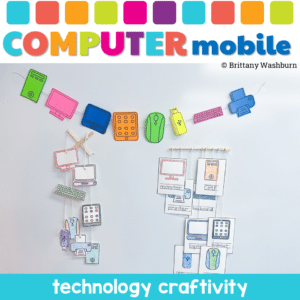
Why Choose the Computer Parts Mobile Craftivity? This isn’t just another classroom activity. It’s a fusion of learning and creativity. Students won’t just learn about computer parts; they’ll experience them. They’ll touch, color, cut, and string, making the learning process immersive and fun. It’s not just about understanding computer components; it’s about expressing creativity and having a blast while doing it!

Introduce a lesson on computers with this eBook that goes over the basics of what a computer is and what different devices include. Great for a warm up activity in the computer lab or classroom. Share the PDF with students for a paperless experience or print the story out as a booklet.

Students are going to love discovering what Valentine’s Day themed design is hidden in the spreadsheet software mystery picture and you’ll love that they are practicing so many different skills. While students may be familiar with paper and pencil mystery pictures, it takes it to a whole new level to do it digitally. Students will really master the toolbar in Google Sheets or Microsoft Excel. The activity has them filling 100 cells in the table per design, making it a mastery activity.

Using technology and problem solving skills, students decipher codes and complete activities to learn about the parts of the computer for grades K-2.

Using technology and problem solving skills, students decipher codes and complete activities to learn about the parts of the computer for grades 3-5.

Hold your students accountable for navigating a web browser independently with this Web Browser Icons bulletin board or display. Stylish yet academic posters, with letters to use as a heading. Just print and set up!

Students color 5 worksheets with icons that represent the different things we can do with a trackpad (click, click and drag, right click, double click, scroll, swipe, etc.). Perfect for an offline activity!
What do you need help with today?
Browse by Tech Topic:


