Digital Click and Drag Mystery Pictures work on so many great technology skills. While students may be familiar with using 100s charts in their math lessons, it brings the skill to a whole new level to use them as mouse or trackpad practice. This set includes 5 August/Summer themed designs in 2 different levels for differentiation between grade levels k-5.
This resource works on so many great technology skills. While students may be familiar with using snap cubes (or counting blocks or whatever you call them) to make designs, it brings the skill to a whole new level to do it digitally. 10 Circus Theme designs in 4 different levels for differentiation between grade levels k-5.
Digital interactive slides for 4th and 5th grade students with a January theme. Timely Tech is designed to help your students build tech skills while incorporating monthly themed digital activities.
When I teach my students with monthly themed activities that bring in the other subject areas, I find that they are more engaged and empowered to learn. There is intentionally lots of repetition from month to month with these Timely Tech activities because students are building both tech and academic skills.
This resource works on so many great technology skills. While students may be familiar with using snap cubes (or counting blocks or whatever you call them) to make designs, it brings the skill to a whole new level to do it digitally. 10 Space Theme designs in 4 different levels for differentiation between grade levels k-5.
These Technology Vocabulary flash cards can be used in so many ways. My favorite is as an independent center. Students flip through the flash cards for an assigned topic and commit the terms to memory.
They also make a great early finisher activity. Or use them as a quick activity at the beginning or end of class.
These are the 6 topics included:
Coding terms
STEM terms
Internet Safety terms
Gsuite terms
Spreadsheet terms
General Computer terms
There are over 200 terms included plus blanks to make more of your own if needed.
For those times when you have a 20-30 minute presentation slot and you need to teach a tech tool, this resource has your back. Description that gives background info and hooks your teachers, how to steps with screenshots, and ideas for use with elementary students. Everything you need to get your staff started with TINKERCAD.
Digital activities for the book The Internet Sleuths that are perfect for grades 3-5. 12 total digital activities that will help students expand their understanding of this great read aloud storybook. I designed this for technology teachers so that you can read the same book to all 3 grade levels and then assign them different activities. You can read it again the next year with fresh activities for the next grade!
Canva Quests: Creative Missions to Learn About Canva. A Guided Canva Introduction for Upper Elementary & Middle School. Looking for a structured, student-friendly way to teach Canva, without overwhelming your students or yourself? Canva Quests is a guided, mission-based Canva lesson that walks students step by step through essential design and photo-editing tools. Instead of open-ended “just explore Canva” activities, students complete clear, focused missions that build confidence and real skill mastery.
This resource works beautifully as an introduction to Canva, a design fundamentals lesson, or a technology center or project-based activity.
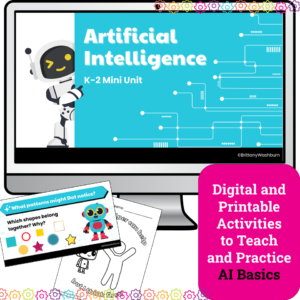
Introduce your youngest learners to the exciting world of Artificial Intelligence with this K–2 AI lesson pack, perfect for the Hour of AI, Hour of Code, or a digital literacy unit. Designed especially for primary classrooms, this unit breaks down complex concepts into engaging, hands-on lessons with no prior tech experience required.
Whether you’re a classroom teacher, tech specialist, or STEM teacher, this 4-lesson AI unit provides a gentle, age-appropriate introduction to how computers “learn,” recognize patterns, and make decisions — all using kid-friendly language and visuals.
What’s Included:
✅ 4 complete AI lessons with clear teacher guides and pacing
✅ Printable handouts and vocabulary visuals
✅ Companion Google Slides decks for modeling and instruction
$12.00Original price was: $12.00.$10.00Current price is: $10.00.
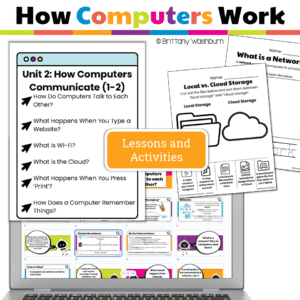
This engaging unit for Grades 1–2 teaches how computers connect, talk, print, save, and store—through easy-to-understand lessons, interactive Google Slides, and hands-on activities. It’s everything you need to build foundational digital literacy and meet ISTE Standards—no prep required!
Help your students understand the invisible world of networks, Wi-Fi, and the internet with this engaging How Computers Communicate unit! Designed for Grades 1–2 technology lessons or the elementary computer lab, this resource combines teacher-friendly PDFs with student-ready Google Slides presentations and built-in interactive practice activities to make digital concepts clear, fun, and age-appropriate.
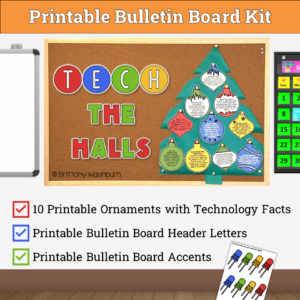
Teach your students about technology facts while having a holiday themed bulletin board or display. Stylish yet academic posters, with letters to use as a heading. Just print, cut, and set up!
Digital activities for the book Coding Can Change the World that are perfect for grades 3-5. 12 total digital activities that will help students expand their understanding of this great read aloud storybook. I designed this for technology teachers or media specialists so that you can read the same book to all 3 grade levels and then assign them different activities. You can read it again the next year with fresh activities for the next grade!
Digital activities for the book Clicker Downloads an App that are perfect for grades K-2. 12 total digital activities that will help students expand their understanding of this great read aloud storybook. I designed this for technology teachers or media specialists so that you can read the same book to all 3 grade levels and then assign them different activities. You can read it again the next year with fresh activities for the next grade!
Digital activities for the book Clicker Goes Viral that are perfect for grades K-2. 12 total digital activities that will help students expand their understanding of this great read aloud storybook. I designed this for technology teachers or media specialists so that you can read the same book to all 3 grade levels and then assign them different activities. You can read it again the next year with fresh activities for the next grade!
Digital Click and Drag puzzles for 11 computer parts. This set has technology themed designs in 2 different levels for differentiation between grade levels k-5.
Technology Integration made easy with Quick Tech! Keyboarding can be fun with these quick tech printable and digital activities! Perfect to reinforce typing skills throughout the school year without wasting precious instructional time. The activities included are all ideal for 1st grade students in interest and complexity.
$81.00Original price was: $81.00.$64.80Current price is: $64.80.
Text formatting is a great way to help students master word processing. Learning keyboarding can be super boring and tedious for students. These sets of formatting activities aim to bring engagement and a sense of purpose to the practice of typing. This is a bundle of all of my text formatting sets.
Each design has 2 sets of directions pages. The first one is lowercase letters and the second one is uppercase letters. This is to give you choice to match your student keyboards. When the students actually type the text, it should all be in lowercase to match the finished examples provided. There is one Advanced set that uses numbers and special keys as an extra challenge.
Try digital animation with your students with a simple and engaging Summer Olympics (Sports) theme project! Students choose from background options and then add shapes, text, and clip art graphics to make a scene. Then they duplicate the slide and make a small change over and over (about 50 times) to animate the scene. Once the stop motion animation is complete students publish it to the web and can optionally make it into a GIF using a website tool.
School Digital CVC word practice slides for Google Slides or PowerPoint. This set has 10 slides of CVC word building and typing practice. There is an School theme on the secret pictures to make it engaging.
Digital Secret Picture Tile Puzzles are great mouse or trackpad practice as well as being an opportunity to practice navigating a Google Slides or PowerPoint file.
Computer parts “game” that can be completed on any device. The interactive PDF has an Cupcake theme, where students get to stack cupcakes with each correct answer. Interactive PDFs are easy to use and students can practice their tech skills from any device!
Digital Secret Picture Tile Puzzles are great mouse or trackpad practice as well as being an opportunity to practice navigating a Google Slides or PowerPoint file. This set has 10 slides of Color Matching. There is an Awesome ’80s theme on the secret pictures to make it engaging.
Presentation Projects for Magnets for students to practice creating presentations in either Google Slides or PowerPoint. There are 2 levels included for differentiation. The facts are the same, but the requirements for the presentation change between the levels.
Review how to use a computer mouse using spring themed work mats. 53 pages of unplugged mouse practice plus 10 slides of digital drag and drop practice! Students practice moving, clicking, and clicking and dragging on paper work mats before they even get on a computer. All you need to do is prep the work mats and grab some extra mice. Then when they are ready, review the skills with the digital slides in PowerPoint or Google Slides.
Students are going to love discovering what Independence Day themed design is hidden in the hundreds chart mystery picture and you’ll love that they are practicing so many different skills. While students may be familiar with paper and pencil hundreds charts, it takes it to a whole new level to do it digitally. Students will really master the toolbar in whatever program you use. The activity has them filling 100 cells in a table per design, making it a mastery activity.
Spiral Review technology lessons that teach presentation, word processing, and spreadsheet software over 12 sessions. These will make a great addition to your technology curriculum for the computer lab. The skills build on each other throughout this unit so it is important to do the lessons in order. Weeks 1-12 are all on the topic of the Kites so students can take a deep dive into the content and the tech skills.
Digital interactive slides for grades K-1 students with a Summer theme. Timely Tech is designed to help your students build tech skills while incorporating monthly themed digital activities.
When I teach my students with monthly themed activities that bring in the other subject areas, I find that they are more engaged and empowered to learn. There is intentionally lots of repetition from month to month with these Timely Tech activities because students are building both tech and academic skills.
13 digital interactive slides for 4th and 5th grade students with a November theme. Timely Tech is designed to help your students build tech skills while incorporating monthly themed digital activities.
When I teach my students with monthly themed activities that bring in the other subject areas, I find that they are more engaged and empowered to learn.
This resource works on so many great technology skills. While students may be familiar with using snap cubes (or counting blocks or whatever you call them) to make designs, it brings the skill to a whole new level to do it digitally. 10 Clothing Theme designs in 4 different levels for differentiation between grade levels k-5.
For those times when you have a 20-30 minute presentation slot and you need to teach a tech tool, this resource has your back. Description that gives background info and hooks your teachers, how to steps with screenshots, and ideas for use with elementary students. Everything you need to get your staff started with Do Ink Green Screen.
For those times when you have a 20-30 minute presentation slot and you need to teach a tech tool, this resource has your back. Description that gives background info and hooks your teachers, how to steps with screenshots, and ideas for use with elementary students. Everything you need to get your staff started with Google Docs.
Digital activities for the book The Berenstain Bears’ Computer Trouble that are perfect for grades 3-5. 12 total digital activities that will help students expand their understanding of this great read aloud storybook. I designed this for technology teachers so that you can read the same book to all 3 grade levels and then assign them different activities. You can read it again the next year with fresh activities for the next grade!
Help your students master punctuation while improving their typing skills with this 40-slide digital resource! Designed to make punctuation practice engaging and effective, this activity guides students through typing sentences that incorporate essential punctuation marks—including commas, semicolons, colons, parentheses, dashes, quotation marks for dialogue, question marks, and exclamation marks.
Help your students master essential internet research skills with this set of 24 Internet Research Task Cards! Designed for upper elementary and middle grade students, these task cards provide engaging, hands-on practice in using search engines effectively, evaluating the reliability of online sources, and utilizing keywords to refine search results. Students will learn how to navigate the vast resources of the internet responsibly while developing critical thinking skills for identifying trustworthy and relevant information.
Even our youngest learners can master graphic design basics with digital design activities like this Recreate an Easter Scene challenge. Students will drag the provided clip art pieces into the work area and then resize and layer the pieces until it looks exactly like the model. I’ve provided 5 challenges that are increasingly more difficult and require more tech skills and perseverance.
In this interactive keyboard activity, students practice the keyboard layout by matching individual letter, number, and punctuation keys to their places on a keyboard.
What is included in this Mid-Size Interactive Keyboard Practice PDF:
12 Keyboard layout options. Windows, Chromebook, Mac, Tablet, and blanks of the layouts.
Print across 2 pages, making it just larger than a full size computer keyboard.
3 Letter options. Serif, Sans Serif, and Cursive fonts.
1 fun decorative font with a STEM theme. 1 phonics font with pictures that represent each letter key.
Help students learn the cursor and browser icons with some simple matching and labeling activities. Great for the beginning of the year or whenever you do your mouse/trackpad and browser navigation lessons.
Students label a browser, match icons to their names, and label icons
Technology Integration made easy with Quick Tech! Help students master software programs with these quick tech digital activities! Perfect to reinforce software skills throughout the school year without wasting precious instructional time. The activities included are all ideal for 2nd grade students in interest and complexity.
Help students master digital design with these quick tech digital activities! Perfect to reinforce digital creative skills throughout the school year without wasting precious instructional time. The activities included are all ideal for 3rd grade students in interest and complexity.
Introduce a lesson on Digital Citizenship with this eBook that goes over Online reputations. In this booklet students learn about what a digital footprint is and how to have a positive online reputation. Share the PDF with students for a paperless experience or print the nonfiction text out as a booklet.
Introduce a lesson on Digital Citizenship with this eBook that goes over Online Peer Pressure. In this booklet students learn about what to do if they are being pressured online. Share the PDF with students for a paperless experience or print the nonfiction text out as a booklet.
Introduce a lesson on Digital Citizenship with this eBook that goes over Blogs. In this booklet students learn about what blogs are and what type of information they contain (opinion commentary). Share the PDF with students for a paperless experience or print the nonfiction text out as a booklet.
Introduce a lesson on Digital Citizenship with this eBook that goes over Media Literacy. In this booklet students learn about media literacy and questions they can ask themselves when viewing media. Share the PDF with students for a paperless experience or print the nonfiction text out as a booklet.
Introduce a lesson on the history of technology with this eBook that goes over the career of Mark Zuckerberg, who created the world’s largest social media platform, Facebook. Great for a warm up activity in the computer lab or classroom. Share the PDF with students for a paperless experience or print the nonfiction text out as a booklet.
Introduce a lesson on the history of technology with this eBook that goes over the career of Elon Musk, who is a computer programmer and business founder known for developing Zip2 and Tesla, among others. Great for a warm up activity in the computer lab or classroom. Share the PDF with students for a paperless experience or print the nonfiction text out as a booklet.
Introduce a lesson on the history of technology with this eBook that goes over the career of Bill Gates, who is known for co-founding Microsoft and creating the Windows Operating System. Great for a warm up activity in the computer lab or classroom. Share the PDF with students for a paperless experience or print the nonfiction text out as a booklet.
Keyboard shortcuts “game” that can be completed on any device. The interactive PDF has an Bubble theme, where students get to pop the bubbles with each correct answer. Interactive PDFs are easy to use and students can practice their tech skills from any device!