Digital Click and Drag Mystery Pictures work on so many great technology skills. While students may be familiar with using 100s charts in their math lessons, it brings the skill to a whole new level to use them as mouse or trackpad practice. This set includes 5 January themed designs in 2 different levels for differentiation between grade levels k-5.
Students are going to love discovering what Cinco de Mayo themed design is hidden in the hundreds chart mystery picture and you’ll love that they are practicing so many different skills. While students may be familiar with paper and pencil hundreds charts, it takes it to a whole new level to do it digitally. Students will really master the toolbar in whatever program you use. The activity has them filling 100 cells in a table per design, making it a mastery activity.
Digital activities for the book Goodnight iPad that are perfect for grades K-2. 12 total digital activities that will help students expand their understanding of this great read aloud storybook. I designed this for technology teachers so that you can read the same book to all 3 grade levels and then assign them different activities. You can read it again the next year with fresh activities for the next grade!
Earth Day review for your intermediate students. 10 paperless interactive activities. Use with a tablet, laptop, computer, anything that can access Google Slides. Fun Earth Day learning resources with practice in:
Vocabulary
ABC order
Web Quest
Acrostic Poem
Cause and Effect
Sorts
Creative Writing
With this resource you will receive a link to a file to be shared with your students in Google Classroom.
Digital activities for the book Chicken Clicking that are perfect for grades 3-5. 12 total digital activities that will help students expand their understanding of this great read aloud storybook. I designed this for technology teachers or media specialists so that you can read the same book to all 3 grade levels and then assign them different activities. You can read it again the next year with fresh activities for the next grade!
Digital activities for the book Unplugged that are perfect for grades K-2. 12 total digital activities that will help students expand their understanding of this great read aloud storybook. I designed this for technology teachers or media specialists so that you can read the same book to all 3 grade levels and then assign them different activities. You can read it again the next year with fresh activities for the next grade!
Digital Secret Picture Tile Puzzles are great mouse or trackpad practice as well as being an opportunity to practice navigating a Google Slides or PowerPoint file. This set has 10 slides of CVC word building and typing practice. There is a New Year’s theme on the secret pictures to make it engaging.
Keyboard shortcuts “game” that can be completed on any device. The interactive PDF has a Donut Hunt theme, where students get to fill boxes of donuts with each correct answer. Interactive PDFs are easy to use and students can practice their tech skills from any device!
Digital activities for the book How to Code a Sandcastle that are perfect for grades 3-5. 12 total digital activities that will help students expand their understanding of this great read aloud storybook. I designed this for technology teachers or media specialists so that you can read the same book to all 3 grade levels and then assign them different activities. You can read it again the next year with fresh activities for the next grade!
Students are going to love discovering what New Years themed design is hidden in the spreadsheet software mystery picture and you’ll love that they are practicing so many different skills. While students may be familiar with paper and pencil mystery pictures, it takes it to a whole new level to do it digitally. Students will really master the toolbar in Google Sheets or Microsoft Excel. The activity has them filling 100 cells in the table per design, making it a mastery activity.
This resource works on so many great technology skills. While students may be familiar with using snap cubes (or counting blocks or whatever you call them) to make designs, it brings the skill to a whole new level to do it digitally. 10 Monsters Theme designs in 4 different levels for differentiation between grade levels k-5.
This resource works on so many great technology skills. While students may be familiar with using 100s charts to make designs, it brings the skill to a whole new level to do it digitally. 12 Technology themed designs in 2 different levels for differentiation between grade levels k-5.
$28.50Original price was: $28.50.$22.80Current price is: $22.80.
Would you like students to work on technology skills while doing fun Valentine’s Day themed activities in the computer lab? Then this bundle is for you!
Build a Valentine’s Day Scene Digital Glyph Activity
Valentine’s Day Digital Animation Project
Valentine’s Day Digital Pixel Art
Valentine’s Day Sheets/Excel Digital Mystery Pictures
Valentine’s Day Digital Hundreds Charts Mystery Pictures
Valentine’s Day CVC Words Digital Puzzles
Valentine’s Day Digital Phonics Drag and Drop
Valentine’s Day Graphic Design Lesson and Activity
Even our youngest learners can master graphic design basics with digital design activities like this Recreate a Spring Scene challenge. Students will drag the provided clip art pieces into the work area and then resize and layer the pieces until it looks exactly like the model. I’ve provided 5 challenges that are increasingly more difficult and require more tech skills and perseverance.
Visual learners appreciate having daily agenda message slides and schedule cards for technology class to know what is coming that session. It also helps to have a visual chart for station rotation organization. This resource includes both to help you get organized in the computer lab.
Introduce a lesson on Online Research Skills with this eBook that goes over Plagiarism. In this booklet students learn about plagiarism and how to avoid it by citing sources. Share the PDF with students for a paperless experience or print the nonfiction text out as a booklet.
Introduce a lesson on Online Research Skills with this eBook that goes over the Search Results page. In this booklet students learn about how to narrow down search results with advanced search strategies. Share the PDF with students for a paperless experience or print the nonfiction text out as a booklet.
Introduce a lesson on Online Research Skills with this eBook that goes over Ads in Search. In this booklet students learn about sponsored content and how to tell if a search result is a paid advertisement. Share the PDF with students for a paperless experience or print the nonfiction text out as a booklet.
STEM goes digital with these fun and engaging design challenges for January. 5 engineering design websites and 5 editable challenges perfect for grades 3 and up. If you are in a paperless classroom or 1:1 with laptops or Chromebooks then these are ideal for you, but can also be used during computer lab time or with the laptop cart.
$108.00Original price was: $108.00.$92.00Current price is: $92.00.
Spiral Review technology lessons that teach presentation, word processing, and spreadsheet software over 36 sessions for each grade level. These will make a great addition to your technology curriculum for the computer lab. The skills build on each other throughout this unit so it is important to do the lessons in order.
Students are going to love discovering what Ocean themed design is hidden in the spreadsheet software mystery picture and you’ll love that they are practicing so many different skills. While students may be familiar with paper and pencil mystery pictures, it takes it to a whole new level to do it digitally. Students will really master the toolbar in Google Sheets or Microsoft Excel. The activity has them filling 100 cells in the table per design, making it a mastery activity.
This resource works on so many great technology skills. While students may be familiar with using snap cubes (or counting blocks or whatever you call them) to make designs, it brings the skill to a whole new level to do it digitally. 10 Sweet Treats Theme designs in 4 different levels for differentiation between grade levels k-5.
$40.00Original price was: $40.00.$34.00Current price is: $34.00.
Using technology and problem solving skills, students decipher codes and complete activities to learn Coding Vocabulary that they will use in any coding program.
Using technology and problem solving skills, students decipher codes and complete activities to learn Coding Vocabulary on the topic of Decomposing (breaking problems into smaller parts).
Testing students in the tech lab comes with challenges! Time is always one of them, then paper, student accommodations, grading, and more. These Technology Assessments were designed to make your life easier, not harder. 9 level 2 assessments in both digital and print format as well as answer sheets to save paper.
$5.00Original price was: $5.00.$3.00Current price is: $3.00.
Digital Mystery Pictures with a Fall Theme for Multiplication and Division Practice. Your students will love discovering what is hidden in the boxes after completing rigorous multi-digit multiplication and division problems.
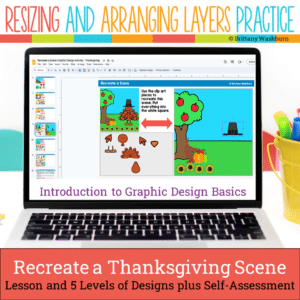
Even our youngest learners can master graphic design basics with digital design activities like this Recreate a Thanksgiving Scene challenge. Students will drag the provided clip art pieces into the work area and then resize and layer the pieces until it looks exactly like the model. I’ve provided 5 challenges that are increasingly more difficult and require more tech skills and perseverance.
Unlock the world of technology careers with a guided research project! Perfect for grades 4-6, this interactive digital download is designed to inspire young minds and develop vital research and presentation skills. Discover the exciting world of technology and set your students on a path to success with this Tech Careers Guided Research Project. 34 Tech Career Posters provided with all of the facts students need to complete their presentation.
Technology Integration made easy with Quick Tech! Keyboarding can be fun with these quick tech printable and digital activities! Perfect to reinforce typing skills throughout the school year without wasting precious instructional time. The activities included are all ideal for 2nd grade students in interest and complexity.
Introduce a lesson on Online Research Skills with this eBook that goes over Copyright. In this booklet students learn strategies what intellectual property is, how a person can copyright it, and about licenses for using or sharing copyrighted materials. Share the PDF with students for a paperless experience or print the nonfiction text out as a booklet.
Introduce a lesson on Online Research Skills with this eBook that goes over How to Read a Web Page. In this booklet students learn about the main parts of a web page and how to skim over the distractions to read them. Share the PDF with students for a paperless experience or print the nonfiction text out as a booklet.
Try digital animation with your students with a simple and engaging Earth Day theme project! Students choose from background options and then add shapes and clip art graphics to make a scene. Then they duplicate the slide and make a small change over and over (about 50 times) to animate the scene. Once the stop motion animation is complete students publish it to the web and can optionally make it into a GIF using a website tool.
Introduce a lesson on computer coding with this eBook that goes over the life of Ada Lovelace, known for her work in computer programming. The eBook includes her contributions to the Analytical Engine and future programming languages. Great for a warm up activity in the computer lab or classroom. Share the PDF with students for a paperless experience or print the nonfiction text out as a booklet.
Presentation Projects for States of Matter for students to practice creating presentations in either Google Slides or PowerPoint. There are 2 levels included for differentiation. The facts are the same, but the requirements for the presentation change between the levels.
STEM goes digital with these fun and engaging design challenges for September. 5 engineering design websites and 5 editable challenges perfect for grades 3 and up. If you are in a paperless classroom or 1:1 with laptops or Chromebooks then these are ideal for you, but can also be used during computer lab time or with the laptop cart.
Presentation Projects for Moon Phases for students to practice creating presentations in either Google Slides or PowerPoint. There are 2 levels included for differentiation. The facts are the same, but the requirements for the presentation change between the levels.
Teachers looking to integrate technology skills and content areas with love this review of PowerPoint/Google Slides skills for students with the topic of Rocks and Minerals. While this is a simple research project, the real goal of this activity is for students to put their notes into a Presentation template (using either Google Slides or PowerPoint) and make it look professional.
Digital interactive slides for 4th and 5th grade students with a April theme. Timely Tech is designed to help your students build tech skills while incorporating monthly themed digital activities.
When I teach my students with monthly themed activities that bring in the other subject areas, I find that they are more engaged and empowered to learn. There is intentionally lots of repetition from month to month with these Timely Tech activities because students are building both tech and academic skills.
For those times when you have a 20-30 minute presentation slot and you need to teach a tech tool, this resource has your back. Description that gives background info and hooks your teachers, how to steps with screenshots, and ideas for use with elementary students. Everything you need to get your staff started with Google Tour Builder.
Digital activities for the book When Charlie McButton Lost Power that are perfect for grades K-2. 12 total digital activities that will help students expand their understanding of this great read aloud storybook. I designed this for technology teachers so that you can read the same book to all 3 grade levels and then assign them different activities. You can read it again the next year with fresh activities for the next grade!
$12.00Original price was: $12.00.$10.00Current price is: $10.00.
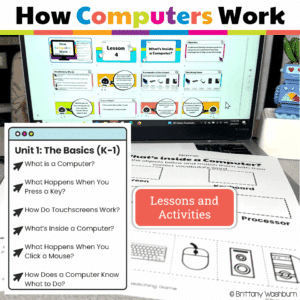
Your K–1 students will love learning how computers work with these interactive, hands-on lessons. From identifying parts of a computer to exploring touchscreens, keyboards, mice, and even beginner coding, this unit builds a strong foundation in digital literacy and responsible tech use—no extra prep required!
Introducing the ultimate tech skills awards certificates set! 30 unique awards for students who excel in technology skills. With catchy award names like Code Wizard, Digital Explorer, and Social Media Star, you can recognize and celebrate the achievements of your tech-savvy students in a fun and creative way.
Each award comes with a brief description of the skills or behaviors required to earn it, making it easy for you to choose the right award for each student.
Digital activities for the book Nerdy Birdy Tweets that are perfect for grades 3-5. 12 total digital activities that will help students expand their understanding of this great read aloud storybook. I designed this for technology teachers or media specialists so that you can read the same book to all 3 grade levels and then assign them different activities. You can read it again the next year with fresh activities for the next grade!
Technology Integration made easy with Quick Tech! Help students master digital design with these quick tech digital activities! Perfect to reinforce digital creative skills throughout the school year without wasting precious instructional time. The activities included are all ideal for 2nd grade students in interest and complexity.
Make keyboarding fun with these quick tech printable and digital activities! Perfect to reinforce typing skills throughout the school year without wasting precious instructional time. The activities included are all ideal for 3rd grade students in interest and complexity.
Stop Motion Animation goes Digital with this Football Digital Animation Project! Students add the provided graphics to make the Football scene. Then they duplicate the slide and make a small change over and over (about 25 times) to animate the scene. Once the stop motion animation is complete students publish it to the web and can optionally make it into a GIF using a website tool.
Introduce a lesson on Digital Citizenship with this eBook that goes over Private and Personal Information. In this booklet students learn about private and personal information and what not to share online. Share the PDF with students for a paperless experience or print the nonfiction text out as a booklet.
Introduce a lesson on Online Research Skills with this eBook that goes over How to take notes on a topic. In this booklet students learn strategies for taking notes, including writing down the source and synthesizing the information into something new. Share the PDF with students for a paperless experience or print the nonfiction text out as a booklet.