Students are going to love discovering what Thanksgiving themed design is hidden in the hundreds chart mystery picture and you’ll love that they are practicing so many different skills. While students may be familiar with paper and pencil hundreds charts, it takes it to a whole new level to do it digitally. Students will really master the toolbar in whatever program you use. The activity has them filling 100 cells in a table per design, making it a mastery activity.
TECHademics is a way to teach technology skills to our youngest learners while also working on academic content. This Kindergarten Math and ELA set for Spring has 12 different math and ELA skills while working on technology skills for the mouse and keyboard.
Using technology and problem solving skills, students decipher codes and complete activities to learn the Online Research Skills topic of Advanced Search. The activities are housed in a Google Slides file and students enter their codes into a locked Google Form.
Students can practice both academic and technology skills together with the right activities. This BUNDLE includes 14 Kindergarten ELA topics. The technology skills practiced will be mouse control (mostly click and drag) and learning the letters on the keyboard. See the ELA topics listed below.
This set is being designed with technology teachers and media specialists in mind, but any kindergarten teacher with access to devices would also find these resources to be very useful. Particularly if you include technology as a station rotation in your classroom.
28 Essential Questions- one for each sub-standard of the International Society for Technology Education Standards for Students. Ideal for helping to inspire technology-infused project based learning in your classroom. As of 7/16/16 these have been fully updated for the 2016 ISTE Standards for Students.
Timely Tech is designed to help your students build tech skills while incorporating monthly themed digital activities. This is a mini unit of 16 digital activities with a winter sports theme. *Not endorsed by the Winter Olympics*
Introduce a lesson on how to read web pages with this eBook that goes over what a web page is and the parts of a web page. Great for a warm up activity in the computer lab or classroom. Share the PDF with students for a paperless experience or print the nonfiction text out as a booklet.
Introduce a lesson on computers parts with this eBook that goes over the parts inside a computer. Great for a warm up activity in the computer lab or classroom. Share the PDF with students for a paperless experience or print the nonfiction text out as a booklet.
Digital interactive slides for grades K-1 students with a April theme. Timely Tech is designed to help your students build tech skills while incorporating monthly themed digital activities.
When I teach my students with monthly themed activities that bring in the other subject areas, I find that they are more engaged and empowered to learn. There is intentionally lots of repetition from month to month with these Timely Tech activities because students are building both tech and academic skills.
Students can practice both academic and technology skills together with the right activities. These digital alphabet activities work in Google Slides or as an interactive PowerPoint on any type of device that has these programs. There are 18 fall themed activity slides to help them practice uppercase and lowercase letter matching, sorting vowels and consonants, sorting uppercase and lowercase letters, complete the word with the right vowel, make a real word with word families, and finding the word that is not like the others.
$29.50Original price was: $29.50.$23.60Current price is: $23.60.
Teach students how to follow and decompose algorithms with these Code Builder digital activities. 2 types of digital activities ask students to follow an algorithm to put a design together and then look at a pre-built design and type their own algorithm for it.
Use these activities as a lesson on understanding what an algorithm is, how to write one, follow one, and decompose one. I even included printable posters and vocabulary cards.
5 Word Processing modules for the Intermediate skills. Most appropriate for students in grades 3-5 or students who have had an introduction to Word Processing. For each skill, there are 2 templates. 1 will open in MS Word, and 1 will open in Google Docs. To use the Google Docs version, your students will need to have Google accounts. The tasks for the assignment are the same whether students are using Word or Docs.
These projects were made out of a desire to guide students to eventually work independently in software programs. They are design to build technology literacy through repetition and engaging project prompts.
Using technology and problem solving skills, students decipher codes and complete activities to learn the Online Research Skills topic of Taking Notes (Putting Information Together). The activities are housed in a Google Slides file and students enter their codes into a locked Google Form.
Using technology and problem solving skills, students decipher codes and complete activities to learn the Online Research Skills topic of Copyright Rules. The activities are housed in a Google Slides file and students enter their codes into a locked Google Form.
Using technology and problem solving skills, students decipher codes and complete activities to learn the Online Research Skills topic of How to Read a Webpage. The activities are housed in a Google Slides file and students enter their codes into a locked Google Form.
The end of the year in the computer lab comes with so many tasks that it can be easy to get overwhelmed or forget something important. This set of checklists and to do lists are completely editable and will hopefully help you feel in control of your end of the year tasks.
Introduce a lesson on how the Internet works with this eBook that goes over how the internet started, how it works, and how we use it. Great for a warm up activity in the computer lab or classroom. Share the PDF with students for a paperless experience or print the nonfiction text out as a booklet.
Digital interactive slides for 2nd and 3rd grade students with a April theme. Timely Tech is designed to help your students build tech skills while incorporating monthly themed digital activities.
When I teach my students with monthly themed activities that bring in the other subject areas, I find that they are more engaged and empowered to learn. There is intentionally lots of repetition from month to month with these Timely Tech activities because students are building both tech and academic skills.
Digital interactive slides for 2nd and 3rd grade students with a January theme. Timely Tech is designed to help your students build tech skills while incorporating monthly themed digital activities.
When I teach my students with monthly themed activities that bring in the other subject areas, I find that they are more engaged and empowered to learn. There is intentionally lots of repetition from month to month with these Timely Tech activities because students are building both tech and academic skills.
Using technology and problem solving skills, students decipher codes and complete activities to learn the Online Research Skills topic of Ads in Search Results and Sponsored Content. The activities are housed in a Google Slides file and students enter their codes into a locked Google Form.
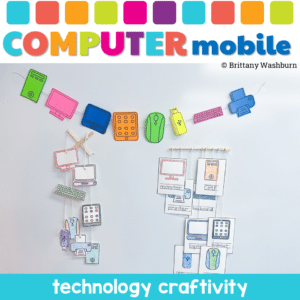
Why Choose the Computer Parts Mobile Craftivity? This isn’t just another classroom activity. It’s a fusion of learning and creativity. Students won’t just learn about computer parts; they’ll experience them. They’ll touch, color, cut, and string, making the learning process immersive and fun. It’s not just about understanding computer components; it’s about expressing creativity and having a blast while doing it!
Digital Secret Picture Tile Puzzles are great mouse or trackpad practice as well as being an opportunity to practice navigating a Google Slides or PowerPoint file. This set has 10 slides of CVC word building and typing practice. There is a Christmas theme on the secret pictures to make it engaging.
Sorting Matrix Digital and Print Activities to teach If/Then/Else coding language (Conditionals). Everything you need to teach students about conditionals and let them practice using the terminology. This resource includes 12 digital slides with moveable pieces and 12 printable activity mats meant to be used with velcro.
Using technology and problem solving skills, students decipher codes and complete activities to learn the Online Research Skills topic of Judging Online Information. The activities are housed in a Google Slides file and students enter their codes into a locked Google Form.
This resource works on so many great technology skills. While students may be familiar with using pattern blocks to make designs, it brings the skill to a whole new level to do it digitally. Each slide has only 1 of each pattern block. This means students need to manipulate the pattern blocks in order to fit them over the design on the mat.
Students are going to love discovering what Valentine’s Day themed design is hidden in the hundreds chart mystery picture and you’ll love that they are practicing so many different skills. While students may be familiar with paper and pencil hundreds charts, it takes it to a whole new level to do it digitally. Students will really master the toolbar in whatever program you use. The activity has them filling 100 cells in a table per design, making it a mastery activity.
Digital interactive slides for 4th and 5th grade students with a December theme. Timely Tech is designed to help your students build tech skills while incorporating monthly themed digital activities.
When I teach my students with monthly themed activities that bring in the other subject areas, I find that they are more engaged and empowered to learn. There is intentionally lots of repetition from month to month with these Timely Tech activities because students are building both tech and academic skills.
11 digital interactive slides for 2nd and 3rd grade students with a November theme. Timely Tech is designed to help your students build tech skills while incorporating monthly themed digital activities.
When I teach my students with monthly themed activities that bring in the other subject areas, I find that they are more engaged and empowered to learn.
Digital activities for the book If you Give a Mouse an iPhone that are perfect for grades K-2. 12 total digital activities that will help students expand their understanding of this great read aloud storybook. I designed this for technology teachers so that you can read the same book to all 3 grade levels and then assign them different activities. You can read it again the next year with fresh activities for the next grade!
Even our youngest learners can master graphic design basics with digital design activities like this Recreate a Fall Scene challenge. Students will drag the provided clip art pieces into the work area and then resize and layer the pieces until it looks exactly like the model. I’ve provided 5 challenges that are increasingly more difficult and require more tech skills and perseverance.
Even our youngest learners can master graphic design basics with digital design activities like this Recreate a Winter Scene challenge. Students will drag the provided clip art pieces into the work area and then resize and layer the pieces until it looks exactly like the model. I’ve provided 5 challenges that are increasingly more difficult and require more tech skills and perseverance.
Introduce a lesson on using a computer mouse or trackpad with this eBook that goes over how a mouse and trackpad work. Starting with the ball-style mouse, then learning about the optical mouse, then on to trackpads and other types of inputs.
$10.00Original price was: $10.00.$8.00Current price is: $8.00.
Students can practice matching upper and lowercase letters by completing 4 sets of 10 engaging winter and spring holiday themed digital secret picture tile puzzles. These puzzles are great mouse or trackpad practice as well as being an opportunity to practice navigating a Google Slides or PowerPoint file.
Digital interactive slides for grades K-1 students with a March theme. Timely Tech is designed to help your students build tech skills while incorporating monthly themed digital activities.
When I teach my students with monthly themed activities that bring in the other subject areas, I find that they are more engaged and empowered to learn. There is intentionally lots of repetition from month to month with these Timely Tech activities because students are building both tech and academic skills.
Guided Projects that Teach making Charts and Graphs in Excel are the ideal way to build technology literacy for our youngest students. This set of 5 projects show students 5 different graph types so that by the time they get through the final project they could do it independently.
Digital activities for the book Webster’s Email that are perfect for grades K-2. 12 total digital activities that will help students expand their understanding of this great read aloud storybook. I designed this for technology teachers so that you can read the same book to all 3 grade levels and then assign them different activities. You can read it again the next year with fresh activities for the next grade!
72 slides of drag and drop activities to build letters and numbers using digital counting cubes. Uppercase and lowercase letters plus numbers 0-19 are included in this engaging and colorful computer lab activity. The activity is housed in google slides, which means it can be used on any type of device.
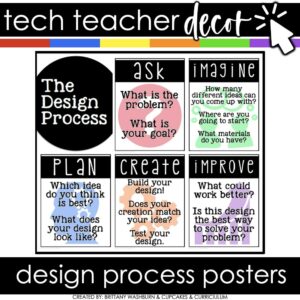
You can have an adorable and stylish classroom while still maintaining a highly academic environment! This set of Technology Themed Design Process Posters is colorful and creative so you can decorate your computer lab, media center, or classroom while inspiring your students to do their best work.
$16.00Original price was: $16.00.$12.80Current price is: $12.80.
These Coding Activities are perfect for your grades 2-5 students. These are fully digital and can be used through Google Slides or PowerPoint. Let your students learn about computer languages in a fun and engaging way. These activities are independent click and go lessons on binary, coding, and problem solving. Perfect for the ISTE standard Computational Thinking. They would even be great for your STEM time in class or your Maker Space during the Hour of Code!
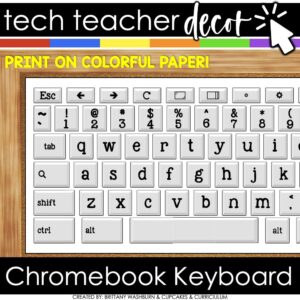
You can have an adorable and stylish classroom while still maintaining a highly academic environment! This Giant Chromebook Keyboard Display is perfect for decorating your computer lab, media center, or classroom while inspiring your students to do their best work.
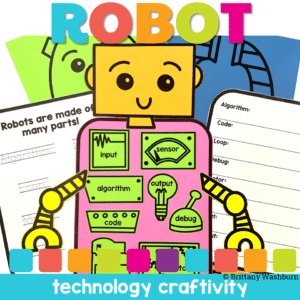
Why Choose Robot Parts Craftivity? It’s not just a craft; it’s a doorway to the world of robotics and coding. This activity offers students a tangible, creative experience, showing them how individual components can come together to form something unique. It’s a blend of learning and creativity, designed to ignite curiosity and passion for robotics and coding.
$8.99Original price was: $8.99.$7.50Current price is: $7.50.
Avatar Character digital glyph and digital animation projects in one bundle. You can use both projects with the same students or have students do the digital glyph the first year and then the digital animation the next year. Ideal for computer lab teachers or upper elementary classroom teachers.
$18.00Original price was: $18.00.$12.00Current price is: $12.00.
Timely Tech is designed to help your students build tech skills while incorporating monthly themed digital activities. When I teach my students with monthly themed activities that bring in the other subject areas, I find that they are more engaged and empowered to learn. This is a set of 23 January Themed Technology Activities for grades K-5.
Here is an idea of how you might separate these activities by grade levels:
K/1: Beginning sounds, Spelling CVC Words, Counting Dice, Before and After Numbers
2/3: Make new words, ABC order, Pixel Art, January words search, Shapes Snowman
4/5: Decoding, Editing spelling errors, New Year Goals, IF/THEN/ELSE, Coding, Multimedia poster, Digital Snow Flakes
$92.74Original price was: $92.74.$64.92Current price is: $64.92.
Stop spending hours hunting for kindergarten tech resources. This full-year bundle gives you everything you need to confidently teach essential technology skills with developmentally appropriate, no-prep activities—both digital and printable.
Whether you follow the included pacing guide or choose your own path, you’ll feel organized and supported every step of the way.
Halloween Digital CVC word practice slides for Google Slides or PowerPoint. This set has 10 slides of CVC word building and typing practice. There is an Halloween theme on the secret pictures to make it engaging.
Digital Secret Picture Tile Puzzles are great mouse or trackpad practice as well as being an opportunity to practice navigating a Google Slides or PowerPoint file.
Introduce a lesson on operating systems with this eBook that goes over what operating systems are and the three most popular operating systems. There are also pages about mobile and chrome OS. Great for a warm up activity in the computer lab or classroom. Share the PDF with students for a paperless experience or print the nonfiction text out as a booklet.
Valentine’s Day Digital CVC word practice slides for Google Slides or PowerPoint. This set has 10 slides of CVC word building and typing practice. There is a Valentine’s Day theme on the secret pictures to make it engaging.