




✅ Shop with Confidence
- 🔒 Secure Checkout – Your payment is safe and protected.
- ⭐ Quality Guaranteed – Store credit refunds if something isn’t right.
- 🎉 Earn Rewards – Get points for every dollar spent & redeem as store credit!
👉 Add to Cart and start using this resource today
Fall Graphic Design Lesson and Activity
$3.00
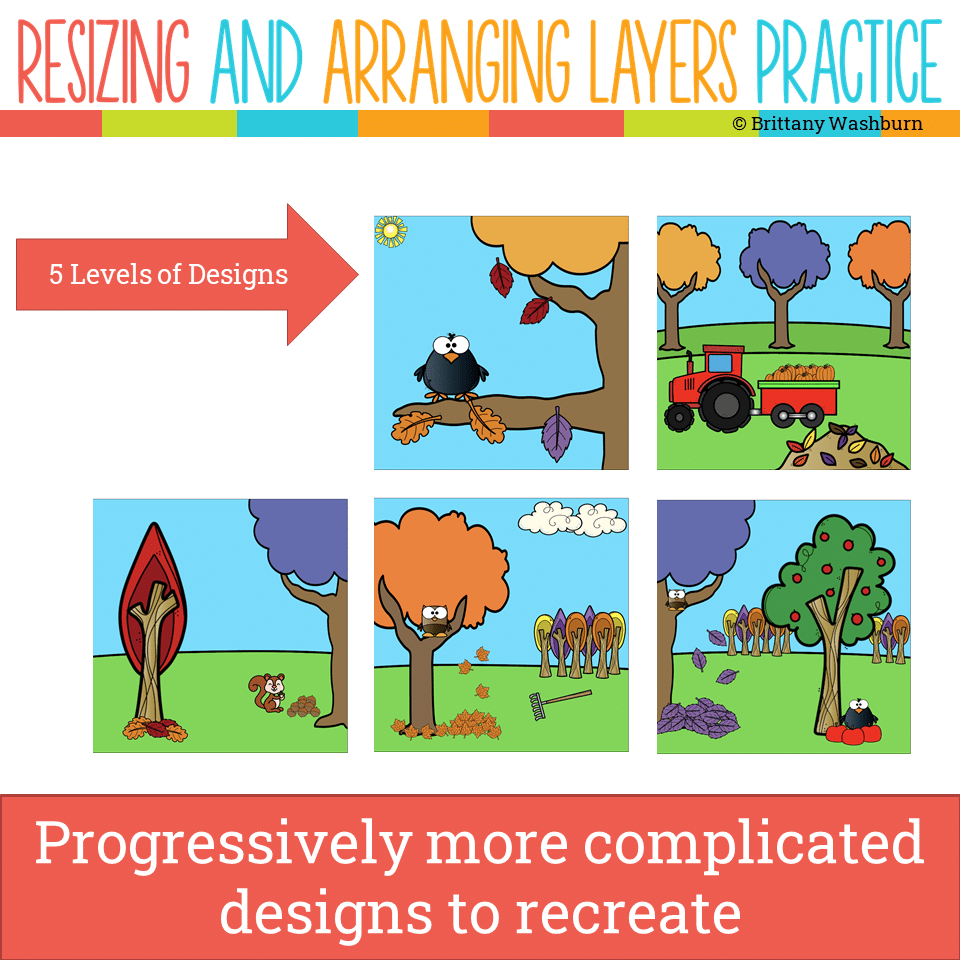
Even our youngest learners can master graphic design basics with digital design activities like this Recreate a Fall Scene challenge. Students will drag the provided clip art pieces into the work area and then resize and layer the pieces until it looks exactly like the model. I’ve provided 5 challenges that are increasingly more difficult and require more tech skills and perseverance.
Fall Graphic Design Lesson and Activity
$3.00
Description
-
Google Slides (or download as PowerPoint)
-
Background and Clip Art Graphics Included
-
5 Levels of Challenge
-
Optional Slide for students to design their own Fall Scene
-
Self-Assessment Questions
-
Empowered Learner: 1c – Students use technology to seek feedback that informs and improves their practice.
-
Computational Thinker: 5c – Students break problems into component parts.
-
Creative Communicator: 6c – Students communicate complex ideas clearly and effectively by using a variety of digital objects.
-
ALIGNMENT
-
FOCAL POINT
-
NEGATIVE SPACE
-
ASPECT RATIO
-
MARGINS
-
SCALE
-
TRIM
-
CROPPING
-
Introduction to Graphic Design Basics
-
How to resize clip art
-
How to arrange layers in Google Slides and in PowerPoint
-
5 slides of design challenges that get progressively more difficult
-
Blank slide with the clip art so they can make their own
-
Self-assessment
Additional information
| Resource Type | Digital Activity, Lesson/Unit |
|---|---|
| Format | Google Apps, PDF |
| Season / Holiday | Fall |
You must be logged in to post a review.
What teachers said on TPT
Rated 4.9 out of 5 by 14 teachers on Teachers Pay Teachers.
“This was perfect for my fourth graders. I like how the different slides helped the students practice skills that were taught, including layering, resizing and rotating. It was just the right level of challenge for the students and will help them become more competent with these basic concepts.”
— Laurie B., TPT review
“My students loved learning about graphics. I did have one student "cheat" by copying the model graphic. To correct this, I took a screenshot of the instructions including the model graphic and this forced students to use the clipart and try to recreate the model graphic. Great activity!”
— TennTechie, TPT review
“I used this with my 4-6 grade students. They had to practice copy and paste, and ordering, as well as resizing. There were several colorful scenes to recreate and it kept the students engaged for the entire class period.”
— Jennifer B., TPT review
Related Products
-

Master Google Apps Bundle
Original price was: $73.00.$65.70Current price is: $65.70. -

4 Seasons Graphic Design Lessons and Activities Bundle
Original price was: $12.00.$9.60Current price is: $9.60. -
4th Grade Software Lessons Weeks 1-12
$12.00 -
5th Grade ELA Standards Digital Resource Library BUNDLE
Original price was: $27.20.$24.48Current price is: $24.48.



You didn’t become a tech teacher to spend your weekends building lessons from scratch. I’m Brittany, a technology curriculum specialist with 1,000+ ISTE-aligned resources designed specifically for K–8 computer lab teachers.
My ready-made digital and printable resources cover everything from digital citizenship and coding fundamentals to multimedia creation and computer essentials, so your planning is handled and your students stay engaged.
Every resource is built to align with ISTE Standards, save you time, and actually work in a computer lab setting, because I’ve taught in one myself.
Browse my bestsellers, or explore by grade level or topic to find exactly what you need.

Reviews
There are no reviews yet.