



✅ Shop with Confidence
- 🔒 Secure Checkout – Your payment is safe and protected.
- ⭐ Quality Guaranteed – Store credit refunds if something isn’t right.
- 🎉 Earn Rewards – Get points for every dollar spent & redeem as store credit!
👉 Add to Cart and start using this resource today
Winter Themed Text Formatting Activities
$4.00
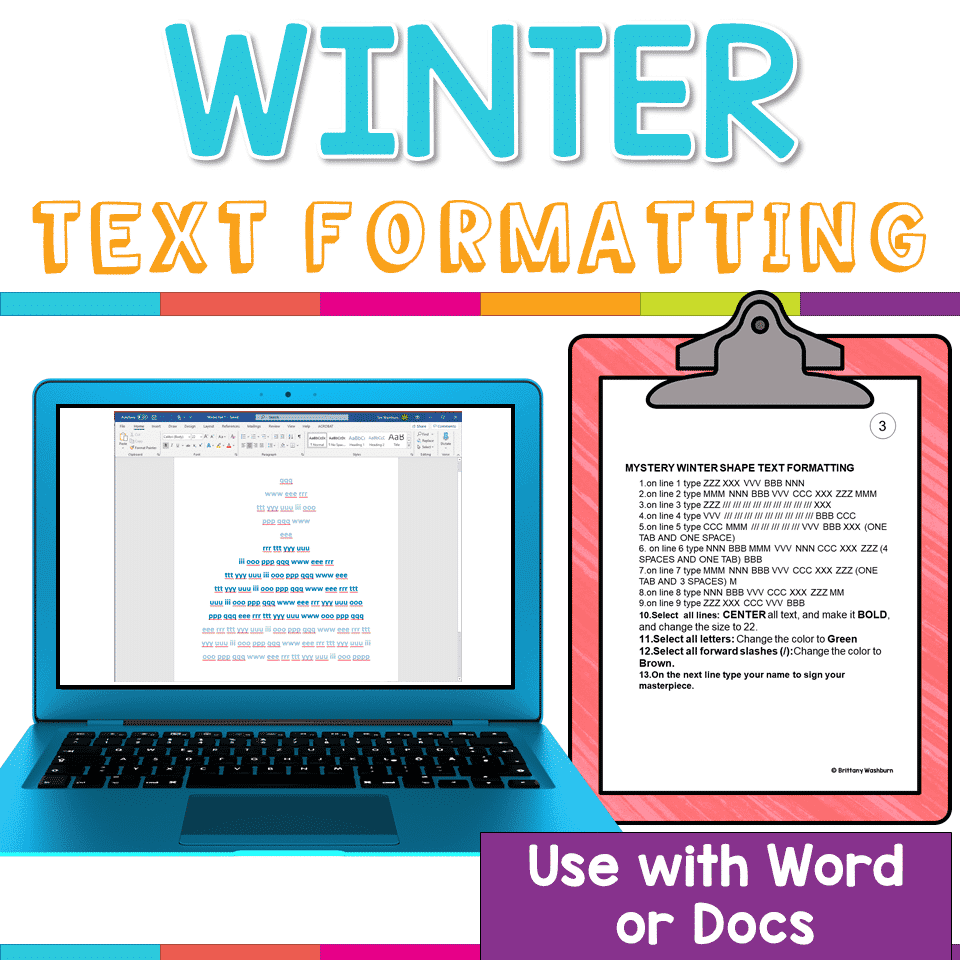
Learning keyboarding can be super boring and tedious for students. This set of 4 Winter Themed text formatting activities aims to bring engagement and a sense of purpose to the practice of typing. Students will also (hopefully) have a sense of pride over the final outcome and an understanding of the learning objective.
You may also like…
-
Sale!

Winter Technology Skills Digital Activities Bundle
Original price was: $29.50.$23.60Current price is: $23.60.
Winter Themed Text Formatting Activities
$4.00
Description
Learning keyboarding can be super boring and tedious for students. This set of 4 Winter Themed text formatting activities aims to bring engagement and a sense of purpose to the practice of typing. Students will also (hopefully) have a sense of pride over the final outcome and an understanding of the learning objective.
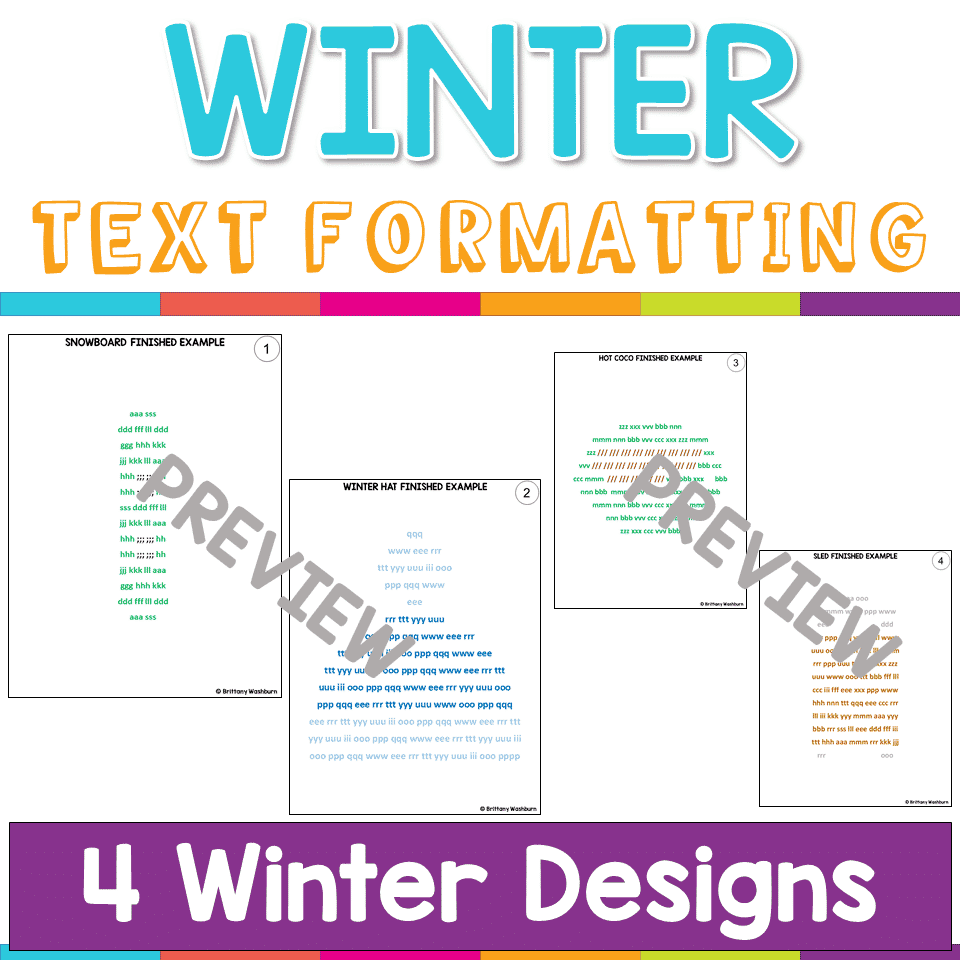
Each design has 2 sets of directions pages. The first one is lowercase letters and the second one is uppercase letters. This is to give you choice to match your student keyboards. When the students actually type the text, it should all be in lowercase to match the finished examples provided.
Ways to add challenge:
•Have students highlight the text with the color instead of changing the font color.
•Have students add a line at the end that says what the shape is.
•Have students add a clip art image that represents the design.
•Have students type a reflection about how the activity went and what they might do differently next time.
Ways to provide supports (make it easier):
•Provide students with a second sheet of paper or a flat edge like a ruler so that they can be looking at one line at a time.
•Dictate the directions one line at a time to students.
•Demonstrate each line as you go using a projector or screensharing software.
Designs Included:
- Snowboard
- Sled
- Hot Cocoa
- Winter Hat
ISTE STANDARDS ADDRESSED
Strand: Innovative Designer
Standard: 4.b. select and use digital tools to plan and manage a design process that considers design constraints and calculated risks.
I Can Statements:
I can stick with a problem until it is solved
I can use the materials around me to help me solve a problem
I can create an original work using a digital tool
Strand: Empowered Learner
Standard: 1.d. understand the fundamental concepts of technology operations, demonstrate the ability to choose, use and troubleshoot current technologies and are able to transfer their knowledge to explore emerging technologies.
I Can Statements:
I can learn a new technology tool by exploring it
I can find any letter or number on a keyboard
Product Terms:
Copyright © Brittany Washburn 2019.
Downloading this file entitles you to ONE classroom use. You may use this with multiple classes but may not share with any other teachers. Copying for more than one teacher, classroom, department, school, or school system is prohibited. This product may not be distributed or displayed digitally for public view. Failure to comply is a copyright infringement and a violation of the Digital Millennium Copyright Act (DMCA). Clipart and elements found in this PDF are copyrighted and cannot be extracted and used outside of this file without permission or license. If multiple licenses are needed for use my more than one teacher or in more than one computer lab, send them here to download the file.
If you’re interested in connecting with other technology teachers, check out the Technology Teacher Tribe Group on Facebook.
Connect with me on social media!
Additional information
| Resource Type | Printable |
|---|---|
| Format | |
| Season / Holiday | Winter |
You must be logged in to post a review.
What teachers said on TPT
Rated 4.7 out of 5 by 21 teachers on Teachers Pay Teachers.
“My students really enjoyed this resource! It was such a fun and engaging way for my students to practice their typing skills and a nice change of pace from the typing websites we use! Thank you so much for creating this resource!”
— Victoria J., TPT review
“Great to use for typing practice. Kids are more engaged as they feel more purpose than just typing random letters. They actually are working towards an outcome.”
— Jennifer F., TPT review
“This was a great way for my students to practice typing and formatting! They were engaged in trying to guess what the picture would be and loved the resource.”
— Jennifer M., TPT review
Related Products
-

Master Google Apps Bundle
Add to cartOriginal price was: $73.00.$65.70Current price is: $65.70. -

4 Seasons Graphic Design Lessons and Activities Bundle
Add to cartOriginal price was: $12.00.$9.60Current price is: $9.60. -
4th Grade Software Lessons Weeks 1-12
Add to cart$12.00 -
5th Grade ELA Standards Digital Resource Library BUNDLE
Add to cartOriginal price was: $27.20.$24.48Current price is: $24.48.



You didn’t become a tech teacher to spend your weekends building lessons from scratch. I’m Brittany, a technology curriculum specialist with 1,000+ ISTE-aligned resources designed specifically for K–8 computer lab teachers.
My ready-made digital and printable resources cover everything from digital citizenship and coding fundamentals to multimedia creation and computer essentials, so your planning is handled and your students stay engaged.
Every resource is built to align with ISTE Standards, save you time, and actually work in a computer lab setting, because I’ve taught in one myself.
Browse my bestsellers, or explore by grade level or topic to find exactly what you need.


Reviews
There are no reviews yet.