
10 Ways to Use Tablets in the Classroom (and How to Choose Them)
Tablets in the classroom work best when every student knows what the tablet is for: creating, practicing, reading or recording, not just playing games. Here are 10 ways to use tablets with elementary students, from coding and creative projects to quick checks for understanding. If you’re still choosing tablets for your classroom, jump to the buying section at the end.
Tablets are my favorite way to do stop motion animation projects. They take much better photos than a laptop and they’re easier for students to handle.
Benefits of Introducing Tablets in Elementary Education
Gone are the days of dusty chalkboards and clunky overhead projectors being the only options for a classroom. The digital age has ushered in a new era of educational tools, with tablets at the forefront.
From enhancing engagement to promoting creativity and critical thinking, tablets offer a myriad of benefits for young learners. Let’s dive into how these devices are transforming the elementary classroom experience.
To begin with, tablets are of course a great way to get your students practicing their skills with educational games. There are a wide range of Educational Apps for Elementary Students, and we have collected the very best for you. We’ve also proposed 21 other ways to use your Tablets in the Classroom for More Than Just Games. Here we will condense all of that into a quick and easy list of 10 ways to use tablets in your elementary classroom!
1. Enhancing Interactive Learning with Educational Apps
Not all apps are created equal. Selecting educational apps that align with curriculum goals and cater to different learning styles is key. It’s all about finding the perfect blend of attention-grabbing fun and robust educational content.
Whether it’s practicing math skills through interactive games or exploring science concepts through virtual simulations, integrating educational apps seamlessly into lesson plans can make learning more engaging and effective. Participate in interactive lessons, such as these Web Based Digital Activities for Any Device. Multi-subject skill practice hubs such as Sheppard Software and Arcademics are also great early finisher destinations!
2. Facilitating Collaborative Projects and Group Work
Tablets can serve as powerful collaboration tools, allowing students to work together on projects, share ideas, and learn from each other. Did you know you could pair digital brainstorming sessions with colorful icons and touch screens? There are many Digital Resources designed for collaboration to help make sure your students are working effectively.
Through group activities facilitated by tablets, students can hone their teamwork and communication skills, learning to listen to others’ ideas and express their own thoughts effectively.
3. Personalized Learning and Differentiation
One size fits all never quite seems to live up to its advertising, does it? Nowhere is that more true than in the world of education. Tablets enable teachers to tailor instruction to meet the unique needs of each student, whether through personalized learning apps or adaptive learning platforms.
Data tracking capabilities abound when students have regular access to those platforms through tablets, so make sure you take advantage of that data. Teachers can monitor student progress in real-time and then adjust learning paths accordingly.
4. Assessing Student Progress and Providing Feedback
Tablets also provide opportunities through programs Kahoot, Educandy and Wayground (formerly Quizizz; here is how I use Wayground) to make assessment more engaging and efficient. You can utilize tablets for formative quizzes, interactive exercises, and summative evaluations. These programs also allow teachers to track student progress in real-time and tailor instruction based on individual learning needs.
Effective Feedback Strategies with Tablet Technology
Provide timely and constructive feedback to students through digital annotation tools, audio recordings, and interactive feedback loops on tablets. These can help students understand their strengths and areas for growth to support continuous improvement.
5. Improving Communication and Parental Involvement
Break down the communication barriers between school and home by leveraging tablets to provide real-time updates on student progress, upcoming events, and important announcements. Keeping parents in the loop fosters a strong school-home connection.
Teachers can empower parents to be active participants in their child’s education journey through recommending interactive apps and collaborative platforms on tablets. Encourage parents to engage in educational activities with their children and support their learning outside the classroom.
6. Promoting Creativity through Digital Tools
Unleash the inner Da Vinci in your students with a myriad of creative apps and tools available on tablets. From digital drawing and animation and storytelling to music composition with apps like Toy Theater, these tools can ignite a spark of creativity in young minds.
Give students the freedom to express themselves and think outside the box by using tablets as a platform for innovation. Encourage them to create multimedia projects, develop their own apps, or showcase their talents through digital mediums.
7. Address Digital Citizenship and Online Safety
You want to instill good digital citizenship habits early on by teaching students the importance of responsible technology use, online etiquette, and digital footprint management. This will equip them with the knowledge and skills to navigate the digital world safely and ethically.
Teachers can also protect student privacy and data security by implementing strict guidelines and safety measures when using tablets in the classroom. Educate students about online risks, cyberbullying, and how to safeguard their personal information in the digital realm.
Begin by learning browsing basics on these 10 Kid-Friendly Browsers for the iPad, and researching other Effective Ways to Promote Digital Citizenship in the Classroom.
8. Code
By embracing coding in the elementary classroom, educators foster critical thinking, creativity, and problem-solving skills in students from an early age.
Kodable, Tynker, Scratch and many other of the most influential coding apps for education are great on tablets. We can show you How to Incorporate Coding Activities into Your Elementary Curriculum like a pro.
9. Read eBooks, Educational Articles and Other Relevant Content
Teach your students how to access tens of thousands of free ebooks available at websites like Project Gutenberg, free audio books at Open Culture, and even story books read aloud for younger students at Storyline Online.
There are also programs like Newsela that provide news articles, aligned to state learning standards and delivered at five different reading levels. Meanwhile, FarFaria offers a world of stories accessed through an interactive map. The free version lets students read one book per day.
10. Utilize Video & Audio Capabilities
Use the built-in audio and video recordings capabilities of tablets to:
- Record video diaries to respond to learning, take notes, capture important information on field trips, and more.
- Make audio recordings to add to projects, or even simply practice reading aloud.
- Engage in video chat and messaging such as the Global Collaborator ISTE STandard might require.
How to Choose Tablets for the Classroom
The best tablet for your classroom is the one your school can manage, charge and protect. Before you buy, check with your tech department, because they may already support one type.
| Option | Best for | Things to know |
|---|---|---|
| iPad | Creative projects, young students, the most education apps | Managed with Apple School Manager; usually costs the most |
| Android tablet | Lower-cost classroom sets | Check that your district can manage them and that your apps work |
| Chromebook tablet or 2-in-1 | Schools that already use Google | Runs web apps and Google Workspace; the touchscreen helps young students |
| Amazon Fire Kids | Home use and reading | Hard to manage in schools, so I’d skip it for classrooms |
Whatever you choose, plan for:
- A rugged case with a handle or stand for each tablet.
- Kid-size headphones for every student.
- A charging cart or station so tablets are ready every morning.
- Device management so you can install apps and block content from one place.
- Routines for getting, using and putting away the tablets.
I may or may not have taken a Dremel to the iPads to number them after everything else I tried wasn’t permanent enough. I was forgiven and we lost way fewer iPads that way!
Resources to Get You Started
Enhancing Learning with Tablets in the Classroom
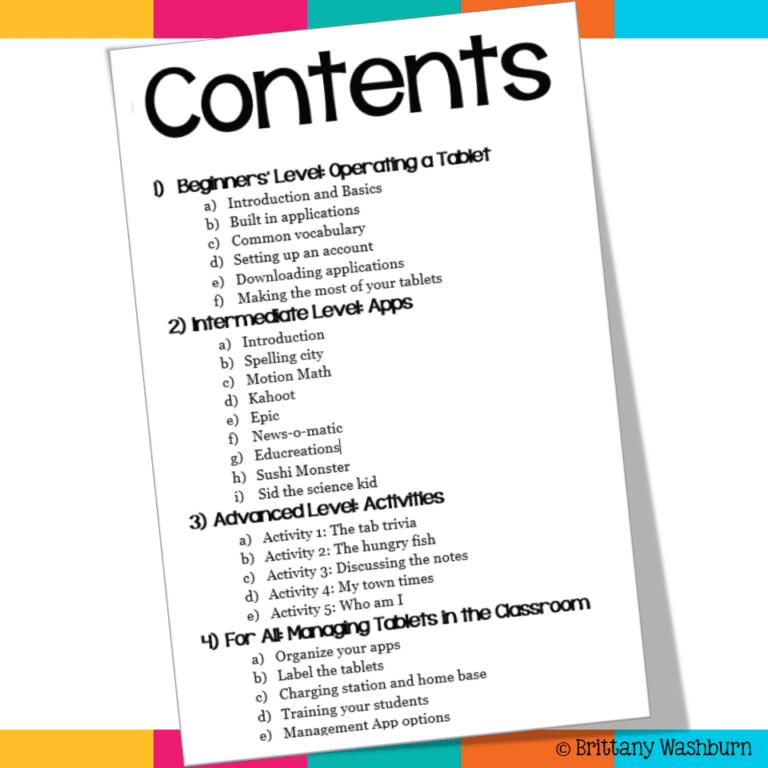
iPad App Activities Tutorials and Task Cards
FAQ
What are the benefits of tablets in the classroom?
Tablets are portable, easy for young students to use with touch, and have built-in cameras and microphones for creating projects, recording reading and documenting learning.
Are iPads or Chromebooks better for elementary students?
iPads are easier for K-2 and have more creative apps. Chromebooks are better once students type a lot and use Google Workspace. Many schools use iPads in K-2 and Chromebooks in 3-5.
How many tablets does a classroom need?
For stations, 5-8 tablets cover a small group at a time. For whole-class lessons, plan on one per student or one per pair.
Final Thoughts
The integration of tablets in the elementary classroom presents educators with a valuable opportunity to leverage technology for the benefit of student learning and engagement. By incorporating educational apps, promoting collaboration, personalizing instruction, fostering creativity, improving communication, enhancing assessment practices, and teaching digital citizenship, tablets can play a significant role in shaping a dynamic and effective learning environment. Embracing the possibilities that tablets offer can empower educators to cater to the diverse needs of their students and equip them with essential skills for success.
10 Ways to Use Tablets in the Classroom (and How to Choose Them)
Tablets in the classroom work best when every student knows what the tablet is for:…

Transforming Learning with AR and VR Field Trips
Augmented Reality (AR) and Virtual Reality (VR) are revolutionizing how students learn, offering a fresh…
iPad Activities for Kindergarten
One of the most popular devices used by students today is the iPad. With its…

Revolutionizing Education with iPads: Tips and Best Practices for Teachers
One of the most popular technological tools used in classrooms is the iPad. Educators have…


