Home » Shopping » Frog Themed Sight Words Typing Flash Cards
✅ Shop with Confidence
🔒 Secure Checkout – Your payment is safe and protected.
⭐ Quality Guaranteed – Store credit refunds if something isn’t right.
🎉 Earn Rewards – Get points for every dollar spent & redeem as store credit!
👉 Add to Cart and start using this resource today
Frog Themed Sight Words Typing Flash Cards
$11.00Original price was: $11.00.$8.00Current price is: $8.00.
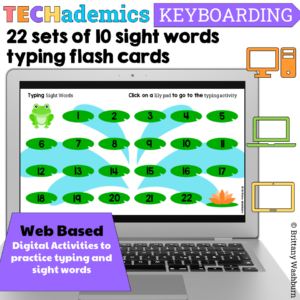
Leap Day can be celebrated in the computer lab with sight word typing digital flash cards! These digital keyboarding activities are web based, which makes them perfect for the computer lab or computer station. This Keyboard practice set has 22 sets of 10 dolch sight words for students to practice typing and sight words together.
Leap Day can be celebrated in the computer lab with sight word typing digital flash cards! These digital keyboarding activities are web based, which makes them perfect for the computer lab or computer station. This Keyboard practice set has 22 sets of 10 dolch sight words for students to practice typing and sight words together.
Activity Contents:
1. 22 sets of 10 sight words from the dolch list
What makes TECHademic activities unique is:
•The activities are web based (which means nothing to download and no account to log into)
•They work in any browser
•They work on any device (great for tablets, chromebooks, or any other device type)
•They are self-checking
•Students get immediate feedback
•They are not games
•They combine tech skills and academic content
•EASY access for students
•NO LOGIN
•No typing URLs
•NOT Flash Based, NOT Google Slides, NOT Boom Cards, NOT Seesaw, these are better and easier for students to access because they are built in HTML5!
Student Access:
1. Add the PDF to each computer or device so that students can open it during their tech station time. Students work through each activity on the TECHademics workmat.
For the teacher to consider:
1. How you’re going to share the PDF with your students. The most efficient way for your students is for you to make a desktop icon that opens the PDF. If using an LMS, send the PDF through your learning management system so that students can open it on their own devices.
2. How you’re going to monitor student progress. The activities don’t save individual progress, so I recommend having students practice to mastery. They can retry any activity until they get it completely right.
3. How long these activities will take students. The answer to this depends on the individual student. Some will breeze through the content while others may take several tries.
Lesson Plan: Digital Typing Flash Cards with Sight Words
Grade Level: K-5
Subject: Technology (Computer Lab)
Duration: 45 minutes
Objectives:
•Students will practice typing sight words accurately.
•Students will utilize immediate feedback to assess their typing accuracy.
•Students will navigate hyperlinks within a PDF document.
•Students will demonstrate persistence and focus in completing multiple sets of sight words.
Materials:
•Computers or laptops with internet access
•PDF document containing hyperlinked numbers leading to sets of sight words
ISTE Standards for Students:
•Empowered Learner: Students leverage technology to take an active role in choosing, achieving, and demonstrating competency in their learning goals.
•Digital Citizen: Students recognize the rights, responsibilities, and opportunities of living, learning, and working in an interconnected digital world.
•Knowledge Constructor: Students critically curate a variety of resources using digital tools to construct knowledge, produce creative artifacts, and make meaningful learning experiences for themselves and others.
•Creative Communicator: Students communicate clearly and express themselves creatively for a variety of purposes using the platforms, tools, styles, formats, and digital media appropriate to their goals.
Procedure:
1. Introduction (5 minutes):
1.Greet the students and explain the purpose of the lesson: to practice typing sight words accurately using digital flashcards.
2.Emphasize the importance of accurate typing skills for effective communication and digital literacy.
2. Instruction (10 minutes):
1.Demonstrate how to navigate the PDF document with hyperlinked numbers to access sets of sight words.
2.Explain the process of typing each sight word, clicking “check” for immediate feedback, and proceeding to the next set upon completion.
3.Review the Dolch sight words list briefly, ensuring students understand the words they will be typing.
3. Activity (25 minutes):
1.Allow students to access the computers and open the PDF document containing the links.
2.Encourage students to work at their own pace, completing as many sets of sight words as possible during the allotted time.
3.Circulate the classroom to provide assistance and support as needed, ensuring students are navigating the hyperlinks correctly and typing accurately with correct posture.
4.Students can practice to mastery by repeating any sets with errors.
4. Closure (5 minutes):
1.Ask students to reflect on their experience with the activity and share any strategies they found helpful for improving their typing accuracy.
2.Distribute exit tickets with the following question ideas:
1.”What was one sight word you found challenging to type accurately? How did you overcome this challenge?”
2.”How did using immediate feedback help you improve your typing skills during this activity?”
3.”What is one goal you have for improving your typing skills in future computer lab sessions?”
3.Collect exit tickets and thank students for their participation.
Assessment:
•Observation of students’ engagement, accuracy, and typing proficiency during the activity.
•Review of exit tickets to gauge students’ reflections and understanding of the lesson objectives.
Extension:
•Encourage students to continue practicing typing sight words outside of class using online resources or typing games.
•Integrate sight words typing practice into future computer lab sessions to reinforce skills and track progress over time.
Failure to comply is a copyright infringement and a violation of the Digital Millennium Copyright Act (DMCA). Clipart and elements found in this PDF are copyrighted and cannot be extracted and used outside of this file without permission or license. If multiple licenses are needed for use my more than one teacher or in more than one computer lab, additional licenses are discounted.
If you would like to get updates on NEW and CURRENT resources for technology teachers…
You didn’t become a tech teacher to spend your weekends building lessons from scratch. I’m Brittany, a technology curriculum specialist with 1,000+ ISTE-aligned resources designed specifically for K–8 computer lab teachers.
My ready-made digital and printable resources cover everything from digital citizenship and coding fundamentals to multimedia creation and computer essentials, so your planning is handled and your students stay engaged.
Every resource is built to align with ISTE Standards, save you time, and actually work in a computer lab setting, because I’ve taught in one myself.
Browse my bestsellers, or explore by grade level or topic to find exactly what you need.
Notifications
Frog Themed Sight Words Typing Flash Cards
$11.00Original price was: $11.00.$8.00Current price is: $8.00.





Reviews
There are no reviews yet.