



✅ Shop with Confidence
- 🔒 Secure Checkout – Your payment is safe and protected.
- ⭐ Quality Guaranteed – Store credit refunds if something isn’t right.
- 🎉 Earn Rewards – Get points for every dollar spent & redeem as store credit!
👉 Add to Cart and start using this resource today
Crack the Code Puzzles for Technology Class
$11.00
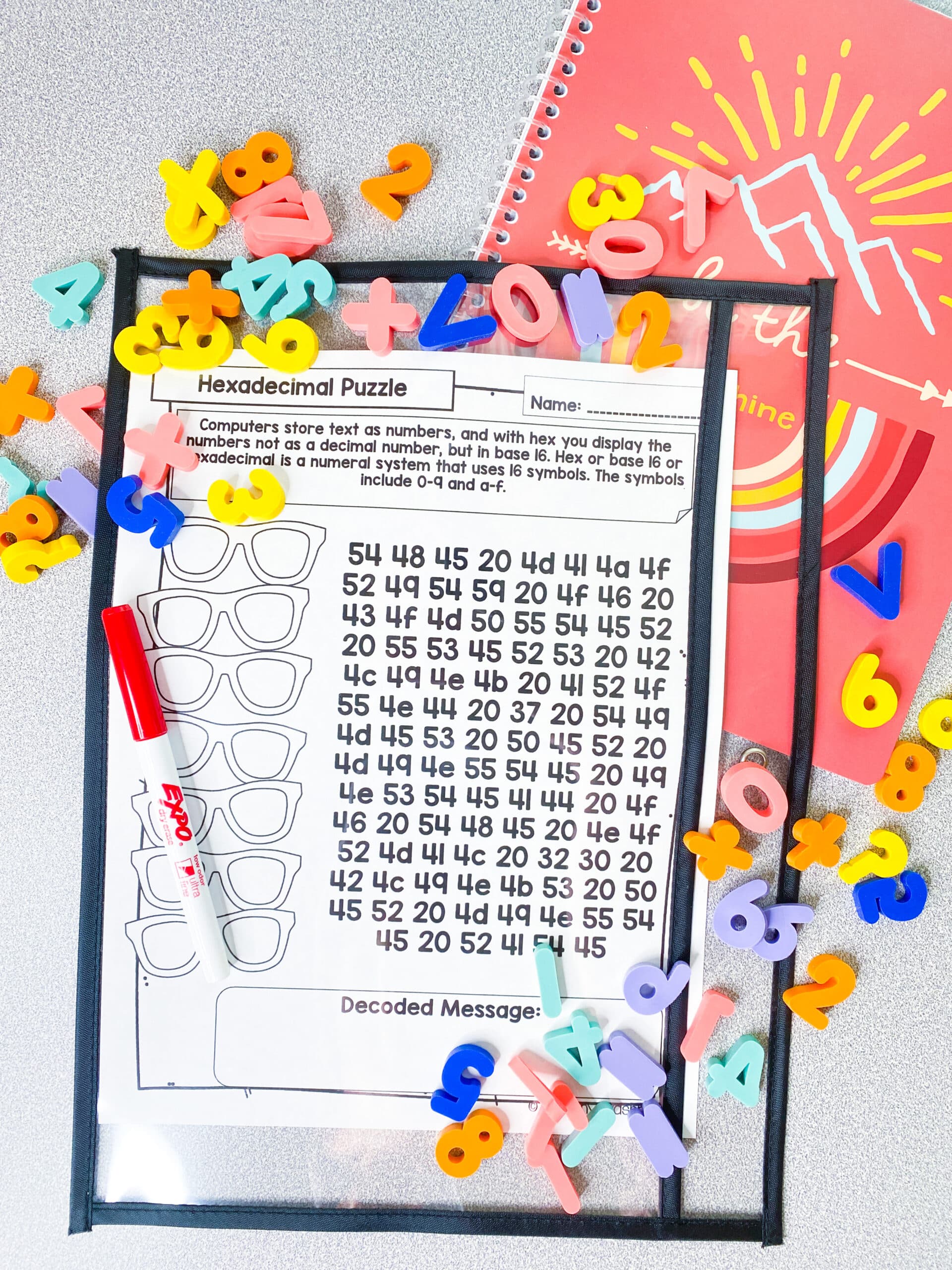
Binary Code, Hexadecimal, and Morse Code Encoded Messages with silly phrases as well as technology facts. This packet would be perfect as bell ringers and for early finishers. Have days without access to devices? These are still Tech lessons but on paper!
You may also like…
-
Sale!

CODING QUESTS – Binary Codes Game
Grades 3–6No device neededOriginal price was: $5.00.$4.00Current price is: $4.00. -
Sale!
Technology Back Up Plans Bundle
Grades K–5No device neededOriginal price was: $184.00.$64.40Current price is: $64.40. -
-
Sale!
Technology Vocabulary Term Word Searches
Grades 3–8Web browserDevice or paperOriginal price was: $6.50.$5.00Current price is: $5.00.


Crack the Code Puzzles for Technology Class
$11.00
Description
Looking for a fun and engaging way to teach your students about technology? Look no further than our Binary Code, Hexadecimal, and Morse Code Encoded Messages packet! Introducing the ultimate tech-inspired resource for teachers and students – Binary Code, Hexadecimal, and Morse Code Encoded Messages with silly phrases as well as technology facts! Perfect for those days when you don’t have access to devices, this packet provides an engaging and entertaining way for students to explore basic concepts related to automation, patterns, and algorithmic thinking.
Designed as quick activities for when the WIFI is down or you can’t use computers, these printables are also perfect for early finisher activities. We recommend laminating the conversion tables so you don’t have to make so many copies! Additionally, this product is perfect for bell-ringers. Display the page and the conversion table under your document camera or straight from your laptop (paperless) for students to solve at their seats.
Not only are these activities engaging, but they also align with the computational thinker standards. Students will understand and explore basic concepts related to automation, patterns, and algorithmic thinking. They will be able to explain how computers use patterns to process and sort information.
Each page features a silly phrase or technology fact that has been encoded using Binary Code, Hexadecimal, or Morse Code. Students must use the provided conversion tables to decode the messages and reveal the hidden message. With a variety of messages included, students will be entertained and engaged for hours on end.
So what are you waiting for? Add this amazing resource to your teaching arsenal and watch your students develop their computational thinking skills while having a blast!
Ideas for using these printables:
- Quick activities for when the wifi is down or you can’t use computers
- Early finisher activities (I recommend laminating the conversion tables so you don’t have to make so many copies)
- Bell-ringers. Display the page and the conversion table under your document camera or straight from your laptop (paperless) for students to solve at their seats.
Standards:
Computational Thinker
- 5.d Students understand and explore basic concepts related to automation, patterns, and algorithmic thinking.
- I can explain how computers use patterns to process and sort information.
Contents:
- Binary Code 2-14
- Hexadecimals 15-28
- Morse Code 29-35
- Answer Keys 36-66
Now also includes a lesson plan and vocabulary list with definitions in the downloadable version.
Vocabulary List:
- Binary Code
- Hexadecimal
- Morse Code
- Automation
- Patterns
- Algorithmic thinking
- Computational thinking
- Conversion table
- Encoding
- Decoding
_________________________________________________________________
Product Terms:
Copyright © Brittany Washburn. Purchasing this file entitles you to ONE classroom use. You may use this with multiple classes but may not share with any other teachers. Copying for more than one teacher, classroom, department, school, or school system is prohibited. This product may not be distributed or displayed digitally for public view. Failure to comply is a copyright infringement and a violation of the Digital Millennium Copyright Act (DMCA). Clipart and elements found in this PDF are copyrighted and cannot be extracted and used outside of this file without permission or license. If multiple licenses are needed for use my more than one teacher or in more than one computer lab, additional licenses are discounted.
If you would like to get updates on NEW and CURRENT resources for technology teachers…
Additional information
| Standards | ISTE, CSTA, TEKS Technology Applications |
|---|---|
| Topic | Coding & Computer Science |
| Resource Type | Activity |
| Device needed | No device needed |
| Made for | Students |
This resource supports the following standards.
ISTE Standards for Students
- 1.5.c – Break problems into parts
- 1.5.d – Use algorithmic thinking
CSTA K-12 Computer Science Standards
- 1A-AP-08 – Create and follow algorithms
- 1A-AP-09 – Represent information with numbers or symbols
- 1A-AP-10 – Develop programs with sequences and loops
- 1A-AP-11 – Decompose the steps to solve a problem
- 1B-AP-10 – Programs with sequences, events, loops and conditionals
- 1B-AP-11 – Decompose problems into smaller parts
Texas TEKS: Technology Applications (19 TAC Chapter 126)
- Gr 2: (c)(1)-(2) Computational thinking
- Gr 3-5: (c)(1)-(2) Computational thinking
255 reviews for Crack the Code Puzzles for Technology Class
Reviewers earn rewards points for any honest review they leave, positive or negative.
You must be logged in to post a review.
Videos
What teachers said on TPT
Rated 4.9 out of 5 by 255 teachers on Teachers Pay Teachers.
“Great product, will definitely be useful on days when the Internet is down or days when testing is in the computer lab and I will be travelling to each classroom. I also plan on using some of these activities for students who finish early and need to be challenged. Thank you! Huge time saver!”
— Jillian E., TPT review
“My students and I really enjoyed these activities. There was competitions to see finished the codes first. It was great to see them all engaged and having some fun while learning too. Thank you and I highly recommend this product.”
— Sandra S., TPT review
“Loved this resource for my Coding Classes. One day a week we do hands on De-Coding and these worksheets have been fun and kept the kids both busy and entertained. Excellent resource.”
— Terri Lynne B., TPT review
You may be interested in…

Related Products


You didn’t become a tech teacher to spend your weekends building lessons from scratch. I’m Brittany, a technology curriculum specialist with 1,000+ ISTE-aligned resources designed specifically for K–8 computer lab teachers.
My ready-made digital and printable resources cover everything from digital citizenship and coding fundamentals to multimedia creation and computer essentials, so your planning is handled and your students stay engaged.
Every resource is built to align with ISTE Standards, save you time, and actually work in a computer lab setting, because I’ve taught in one myself.
Browse my bestsellers, or explore by grade level or topic to find exactly what you need.


Dana McCormick –
Verified TPT reviewI have used this resource with my 8th graders in Technology class. Students have enjoyed the code-breaking puzzlers! Thank you.
Christy G. –
Verified TPT reviewThis has been an awesome tool for me to use as a bell ringer or as back up work for a sub.
Courtney M. –
Verified TPT reviewReally makes me and my students use our brain power
Colleen C. –
Verified TPT reviewGreat activity for when the internet is down! 🙂
ALPHArama –
Verified TPT reviewGreat for unplugged days or as a backup plan.
KIMBERLY E. –
Verified TPT reviewMy students loved doing this decoder activity. They were all engaged in this.
Created by Dawn Kelly –
Verified TPT reviewStudents worked in groups as part of challenges competing against one another. They loved it!
Cassandra J. –
Verified TPT reviewThis is great for those students who finish their work a little early. Awesome!
Elizabeth K. –
Verified TPT reviewBought this for centers/days when I’m out due to illness/other. Students seemed to enjoy very much and wanted to figure out the puzzles.
Bilingual Sunshine –
Verified TPT reviewStudents loved using this! Some have even asked for more. You can tell which students like to solve puzzles and a challenge.
Casey G. –
Verified TPT reviewMy love using this resource with my students.
Shelly Eldridge –
Verified TPT reviewFantastic computer science unplugged activity!
Doreen P. –
Verified TPT reviewThis resource can be used a variety of ways. Most recently, I used it as a fast finisher activity. I could also see using this as part of my emergency sub plans.
Vicky P. –
Verified TPT reviewExcellent resource to keep my early finishers engaged ever after they’ve finished everything.
amanda S. –
Verified TPT reviewGreat engaging activity to begin examining codes and cryptography.
Emily P. (verified owner) –
Verified TPT reviewEven my 6th graders who don’t like anything love when they get to do these. Great for early finishers or for when our internet is down. I’ve laminated several copies of each and we use dry erase markers to complete them since I have 200 students every day. Saves on paper!
Katie M. (verified owner) –
Verified TPT reviewGreat for tech days when students forget their Chromebooks or we need a day offline in the traditional sense. The students think these are really fun!!
Destini V (verified owner) –
Verified TPT reviewThese are challenging and engaging enough to keep my 8th grade computer class kiddos busy! I love the different themes and enjoy having these around as a computer related offline assignment to differentiate my class!
Jennifer K. (verified owner) –
Verified TPT reviewThis is great work to combine with some computer learning. These kids are on computers all day so I like this as a computer learning activiy but not on a computer!!!! They loved it! Kept them working quietly!
Caitlin G. (verified owner) –
Verified TPT reviewMy students absolutely loved this resource! I could see it being used in many different ways – fast finisher activity, warm ups, and more! We did it as an around-the-room.