Home » Shopping » Build a Path Coding Concepts Worksheets
✅ Shop with Confidence
🔒 Secure Checkout – Your payment is safe and protected.
⭐ Quality Guaranteed – Store credit refunds if something isn’t right.
🎉 Earn Rewards – Get points for every dollar spent & redeem as store credit!
👉 Add to Cart and start using this resource today
Build a Path Coding Concepts Worksheets
$3.00
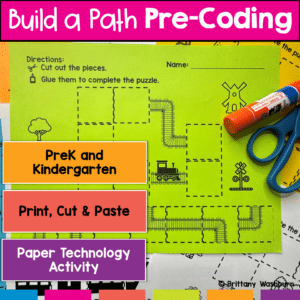
Introducing the “Build a Path Coding Practice” worksheets – your go-to resource for introducing pre-coding concepts to PreK and Kindergarten students! Designed with young learners in mind, this set of engaging and interactive worksheets is perfect for teachers and homeschooling parents who want to lay a strong foundation for computational thinking, without needing any background in computer science.
Introducing the “Build a Path Coding Practice” worksheets – your go-to resource for introducing pre-coding concepts to PreK and Kindergarten students! Designed with young learners in mind, this set of engaging and interactive worksheets is perfect for teachers and homeschooling parents who want to lay a strong foundation for computational thinking, without needing any background in computer science.
Why Choose Build a Path Coding Practice?
Develop Essential Skills: These worksheets are more than just a fun activity; they’re a stepping stone to developing crucial skills like spatial awareness, problem-solving, sequencing, and understanding directions – all foundational for future success in coding and beyond.
No Tech Required: Dive into the world of pre-coding without any screens or gadgets. This hands-on approach ensures screen-free learning, making it ideal for tactile and visual learners.
Easy to Use: With clear instructions and a simple cut-and-paste format, these worksheets are designed for ease of use. You don’t need a computer science degree to facilitate this engaging activity!
Inside the Build a Path Coding Practice:
Printable Worksheets: Ready-to-use sheets with pre-formatted squares and path pieces, designed for easy cutting and pasting.
Step-by-Step Guide: Detailed instructions to guide you through the activity, ensuring a smooth and enjoyable teaching experience.
Flexible Learning: Whether in a classroom setting or at home, these worksheets are adaptable to various learning environments.
Who Can Benefit?
PreK and Kindergarten Teachers: Incorporate this resource into your lesson plan to introduce coding concepts in a fun and interactive way.
Homeschooling Parents: Confidently teach pre-coding skills at home, even if you’re new to the concept of coding.
Childcare Providers: Offer a unique and educational activity that combines learning with play.
Take the First Step on the Coding Journey
Don’t miss this opportunity to introduce your students or children to the exciting world of coding in a simple, enjoyable, and impactful way. Download the “Build a Path Coding Practice” worksheets today and pave the path to computational thinking and beyond!
Embrace the journey of learning with Build a Path Coding Practice – where every piece fits perfectly into the puzzle of future success in coding and technology!
Lesson Plan: Build a Path Coding Practice
Background Knowledge for the Teacher
Before conducting this lesson, it’s important to understand that pre-coding skills lay the foundation for computational thinking. Activities like “Build a Path Coding Practice” help young learners develop spatial awareness, problem-solving skills, and an understanding of sequencing. These skills are crucial as they form the basis for more complex coding concepts that students will encounter later.
Objectives
1. Fine Motor Skills Development: Students will enhance their fine motor skills through cutting and pasting activities.
2. Spatial Awareness: Students will demonstrate an understanding of spatial concepts by arranging path pieces to form a continuous path.
3. Sequencing and Problem-Solving: Students will improve their ability to sequence steps and solve problems by determining the correct order of the path pieces.
4. Introduction to Directional Concepts: Students will be introduced to basic directional concepts (e.g., forward, left, right) that are foundational for future coding activities.
“I Can” Statements
1. I Can Create: I can cut out the path pieces and paste them onto the squares to make a complete path.
2. I Can Solve: I can look at the different pieces and decide which piece comes next to build the path correctly.
3. I Can Understand Directions: I can understand and follow basic directional terms like start, end, left, and right.
2016 ISTE Standards Addressed
1. Empowered Learner: Students leverage technology to take an active role in choosing, achieving, and demonstrating competency in their learning goals (1a).
2. Innovative Designer: Students use a variety of technologies within a design process to identify and solve problems by creating new, useful, or imaginative solutions (4a).
3. Computational Thinker: Students develop and employ strategies for understanding and solving problems in ways that leverage the power of technological methods to develop and test solutions (5a).
Activity Description
This lesson plan for “Build a Path Coding Practice” is designed to engage PreK and Kindergarten students in pre-coding concepts through an interactive and hands-on activity. It aims to develop fine motor skills, spatial awareness, problem-solving abilities, and an understanding of sequencing and direction, setting a strong foundation for future coding and computational thinking skills.
1. Introduction (5 minutes):
1.Briefly discuss the importance of following directions and how it can help us reach our destination.
2.Introduce the “Build a Path Coding Practice” activity.
2. Activity Instructions (10 minutes):
1.Show the students the worksheets with the pre-formatted squares and the path pieces.
2.Demonstrate how to cut the path pieces and discuss the importance of being careful and precise.
3.Explain how to look at the shape of the path and decide which piece fits next.
3. Independent or Group Work (20 minutes):
1.Students work independently or in small groups to cut and paste the path pieces onto the squares.
2.Encourage students to think about the direction of the path and what piece should come next.
3.Monitor and assist as needed, encouraging students to use problem-solving skills.
4. Discussion and Reflection (10 minutes):
1.Have students share their completed paths with the class or within their groups.
2.Discuss any challenges they faced and how they solved them.
3.Reinforce the concepts of sequencing, spatial awareness, and following directions.
5. Closure (5 minutes):
1.Recap what was learned during the lesson.
2.Emphasize how the skills practiced in this activity are foundational for learning coding and other complex tasks.
Exit Ticket Questions
1. Reflection: What part of building your path did you enjoy the most?
2. Understanding: Can you tell me about a time during the activity when you had to think carefully about which piece to put next?
3. Application: How do you think the skills you practiced today will help you in learning how to code in the future?
You didn’t become a tech teacher to spend your weekends building lessons from scratch. I’m Brittany, a technology curriculum specialist with 1,000+ ISTE-aligned resources designed specifically for K–8 computer lab teachers.
My ready-made digital and printable resources cover everything from digital citizenship and coding fundamentals to multimedia creation and computer essentials, so your planning is handled and your students stay engaged.
Every resource is built to align with ISTE Standards, save you time, and actually work in a computer lab setting, because I’ve taught in one myself.
Browse my bestsellers, or explore by grade level or topic to find exactly what you need.







Reviews
There are no reviews yet.