


✅ Shop with Confidence
- 🔒 Secure Checkout – Your payment is safe and protected.
- ⭐ Quality Guaranteed – Store credit refunds if something isn’t right.
- 🎉 Earn Rewards – Get points for every dollar spent & redeem as store credit!
👉 Add to Cart and start using this resource today
Computer Parts Mobile Craftivity
$3.00
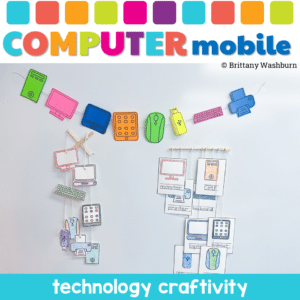
Why Choose the Computer Parts Mobile Craftivity? This isn’t just another classroom activity. It’s a fusion of learning and creativity. Students won’t just learn about computer parts; they’ll experience them. They’ll touch, color, cut, and string, making the learning process immersive and fun. It’s not just about understanding computer components; it’s about expressing creativity and having a blast while doing it!
Computer Parts Mobile Craftivity
$3.00
Description
-
Templates of computer parts (monitor, keyboard, mouse, CPU tower) printed on cardstock (one set per student)
-
Differentiated sets: coloring only, fill in the blank, or write the definition
-
Colored pencils, crayons, etc.
-
Yarn or string
-
Hole puncher or tape
-
Scissors
-
Optional: popsicle sticks, chopsticks, or other hanger
-
Color and cut out the computer part templates. Depending on which version you choose, students may have to trace the word or write a definition of the item.
-
Punch a hole at the top of each piece to prepare them for stringing.
-
As they work on each piece, encourage them to review the function of that particular computer component.
-
Make sure all of the computer part templates are colored, cut out, and have holes punched.
-
Start by tying a knot at the end of the yarn or string.
-
Thread the yarn through the holes of each computer part and tie a knot.
-
Leave some extra length at the top for hanging.
-
Monitor: Shows all the words and pictures for the computer. It is like a TV screen.
-
CPU: The computer’s brain. It helps the computer think and do things.
-
Keyboard: Buttons you press to type words and make the computer do things.
-
Mouse: Helps you point to things on the computer screen and click to open them.
-
USB Drive: Like a tiny pocket for the computer. You can put important things on it and carry it around.
-
Printer: A machine that makes pictures and words from the computer into real paper pictures and words.
-
Tablet: A special kind of computer you can touch with your finger. You can use it for games, drawing, and learning.
-
Laptop: A portable computer you can carry like a book. It has a screen, keyboard and mouse built in so you can use it anywhere.
You must be logged in to post a review.

Related Products
-

Advanced Keyboarding Text Formatting Activities
$7.00 -

Alphabet Keyboard Practice
$5.00 -
Basic Robotics Printable Task Cards
Original price was: $6.00.$3.00Current price is: $3.00. -
Basic Troubleshooting Printable Task Cards
$6.00



You didn’t become a tech teacher to spend your weekends building lessons from scratch. I’m Brittany, a technology curriculum specialist with 1,000+ ISTE-aligned resources designed specifically for K–8 computer lab teachers.
My ready-made digital and printable resources cover everything from digital citizenship and coding fundamentals to multimedia creation and computer essentials, so your planning is handled and your students stay engaged.
Every resource is built to align with ISTE Standards, save you time, and actually work in a computer lab setting, because I’ve taught in one myself.
Browse my bestsellers, or explore by grade level or topic to find exactly what you need.
Reviews
There are no reviews yet.