Introduce a lesson on the history of technology with this eBook that goes over the life of Hedy Lamarr, who developed the technology we now know as Bluetooth. eBooks are a great for a warm up activity in the computer lab or classroom. Share the PDF with students for a paperless experience or print the nonfiction text out as a booklet.
$64.00Original price was: $64.00.$57.60Current price is: $57.60.
Introduce a lesson on the history of technology with eBooks about the people important to technology. eBooks are a great for a warm up activity in the computer lab or classroom. Share the PDF with students for a paperless experience or print the nonfiction text out as a booklet.
Introduce a lesson on the history of technology with this eBook that goes over the life of Benjamin Banneker, who was self-taught in the study of astronomy and wrote almanacs. eBooks are a great for a warm up activity in the computer lab or classroom. Share the PDF with students for a paperless experience or print the nonfiction text out as a booklet.
Introduce a lesson on the history of technology with this eBook that goes over the life of Annie Easley, who worked for NASA and helped develop rocket launching technology. eBooks are a great for a warm up activity in the computer lab or classroom. Share the PDF with students for a paperless experience or print the nonfiction text out as a booklet.
Introduce a lesson on the history of technology with this eBook that goes over the life of Alexander Graham Bell, who is famous for inventing the Telephone. eBooks are a great for a warm up activity in the computer lab or classroom. Share the PDF with students for a paperless experience or print the nonfiction text out as a booklet.
Introduce a lesson on the history of technology with this eBook that goes over the career of John V. Atanasoff, who developed the first digital electronic computer. Great for a warm up activity in the computer lab or classroom. Share the PDF with students for a paperless experience or print the nonfiction text out as a booklet.
Introduce a lesson on the history of technology with this eBook that goes over the career of Bill Atkinson, who is known for creating graphics and software programs for Apple. Great for a warm up activity in the computer lab or classroom. Share the PDF with students for a paperless experience or print the nonfiction text out as a booklet.
Introduce a lesson on the history of technology with this eBook that goes over the life of Nikola Tesla, an inventor who worked with electricity. Great for a warm up activity in the computer lab or classroom. Share the PDF with students for a paperless experience or print the nonfiction text out as a booklet.
Presentation Projects for Muscles and Bones for students to practice creating presentations in either Google Slides or PowerPoint. There are 2 levels included for differentiation. The facts are the same, but the requirements for the presentation change between the levels.
Students are going to love discovering what farm themed design is hidden in the hundreds chart mystery picture and you’ll love that they are practicing so many different skills. While students may be familiar with paper and pencil hundreds charts, it takes it to a whole new level to do it digitally. Students will really master the toolbar in whatever program you use. The activity has them filling 100 cells in a table per design, making it a mastery activity.
Digital interactive slides for 2nd and 3rd grade students with a Summer theme. Timely Tech is designed to help your students build tech skills while incorporating monthly themed digital activities.
When I teach my students with monthly themed activities that bring in the other subject areas, I find that they are more engaged and empowered to learn. There is intentionally lots of repetition from month to month with these Timely Tech activities because students are building both tech and academic skills.
$12.00Original price was: $12.00.$10.00Current price is: $10.00.
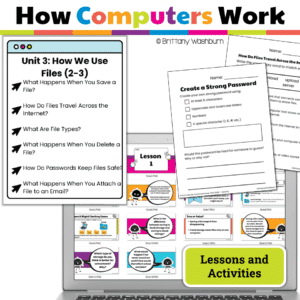
Teach young learners how computers organize, save, and print files! This engaging unit for Grades 2-3 breaks down complex tech concepts like file types, saving, cloud storage, printing, and memory into kid-friendly lessons. Includes print + Google Slides, interactive activities, and ISTE alignment—no prep needed!
$12.00Original price was: $12.00.$6.00Current price is: $6.00.
If you have iPads to use with your students, want to introduce the default apps, and want students to practice using the apps independently, then this set of tutorials and task cards is for you!
I often hear that teachers have a class set of iPads and aren’t allowed to add new apps to them. They then think the activities that can be done are very limited. These tutorials and task cards are here to show you all of the possibilities with these 6 default apps that come pre-installed on iPads.
$61.50Original price was: $61.50.$49.20Current price is: $49.20.
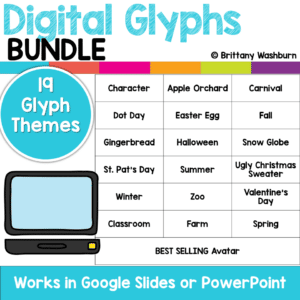
Digital Glyphs work on so many great technology skills. While students may be familiar with paper and pencil glyph activities, it takes it to a whole new level to do it digitally.
In each themed activity, students will be asked to work across slides in either Google Slides or PowerPoint, copy and paste between slides, resize pieces, layer pieces, group pieces, and save their finished work as an image file. All while completing an engaging get-to-know-you activity.
Introduce lessons on computer basics with these videos. These are screencast videos of me reading the computer basics eBooks. The PDF eBooks are not included in this video bundle. There are 14 .mp4 files and a terms of use page.
Introduce a lesson on the history of technology with this eBook that goes over the career of Ellen Ochoa, who logged over 1,000 hours in space and worked on the optical systems in spacecrafts. eBooks are a great for a warm up activity in the computer lab or classroom. Share the PDF with students for a paperless experience or print the nonfiction text out as a booklet.
Introduce a lesson on the history of technology with this eBook that goes over the career of Larry Page, who studied the world wide web and co-founded the search engine Google. eBooks are a great for a warm up activity in the computer lab or classroom. Share the PDF with students for a paperless experience or print the nonfiction text out as a booklet.
Introduce a lesson on the history of technology with this eBook that goes over the life of Douglas Engelbart, who developed the first computer mouse and pioneered Internet connection. eBooks are a great for a warm up activity in the computer lab or classroom. Share the PDF with students for a paperless experience or print the nonfiction text out as a booklet.
Presentation Projects for Light Waves for students to practice creating presentations in either Google Slides or PowerPoint. There are 2 levels included for differentiation. The facts are the same, but the requirements for the presentation change between the levels.
$36.00Original price was: $36.00.$28.80Current price is: $28.80.
This resource works on so many great technology skills. While students may be familiar with using snap cubes (or counting blocks or whatever you call them) to make designs, it brings the skill to a whole new level to do it digitally. 10 Weather Theme designs in 4 different levels for differentiation between grade levels k-5.
This resource works on so many great technology skills. While students may be familiar with using snap cubes (or counting blocks or whatever you call them) to make designs, it brings the skill to a whole new level to do it digitally. 10 Fitness Theme designs in 4 different levels for differentiation between grade levels k-5.
This resource works on so many great technology skills. While students may be familiar with using snap cubes (or counting blocks or whatever you call them) to make designs, it brings the skill to a whole new level to do it digitally. 10 Sports Theme designs in 4 different levels for differentiation between grade levels k-5.
Digital activities for the book Tek The Modern Cave Boy that are perfect for grades K-2. 12 total digital activities that will help students expand their understanding of this great read aloud storybook. I designed this for technology teachers so that you can read the same book to all 3 grade levels and then assign them different activities. You can read it again the next year with fresh activities for the next grade!
89 I Can Statements for the 2016 ISTE Standards for Students. These are designed to match the Technology Themed Decor Classroom Set. Both portrait and landscape layouts are included as well as blank templates for you to make your own.
$32.50Original price was: $32.50.$26.00Current price is: $26.00.
Would you like students to work on technology skills while doing fun Saint Patrick’s Day themed activities in the computer lab? Then this bundle is for you!
Build a Saint Pat’s Day Scene Digital Glyph Activity
Saint Patrick’s Day Digital Animation Project
Saint Pat’s Day Digital Pixel Art
Saint Patrick’s Day Sheets/Excel Digital Mystery Pictures
Saint Pat’s Day Digital Hundreds Charts Mystery Pictures
Saint Patrick’s Day CVC Words Digital Puzzles
Saint Pat’s Day Digital Phonics Drag and Drop
Saint Patrick’s Day Graphic Design Lesson and Activity
Introduce a lesson on creativity in technology with this eBook that teaches about the history and development of HTML5. Share the PDF with students for a paperless experience or print the nonfiction text out as a booklet.
Introduce a lesson on Stop Motion with this eBook that teaches about the history and development of Stop Motion. Share the PDF with students for a paperless experience or print the nonfiction text out as a booklet.
Digital activities for the Summer Olympics for grades k-5. Timely Tech is designed to help your students build tech skills while incorporating monthly themed digital activities. This is a mini unit of 16 digital activities with a summer sports theme.
$124.00Original price was: $124.00.$99.20Current price is: $99.20.
Introduce a lesson on the history of technology with eBooks about the people important to technology. eBooks are a great for a warm up activity in the computer lab or classroom. Share the PDF with students for a paperless experience or print the nonfiction text out as a booklet.
Introduce a lesson on the history of technology with eBooks about the people important to technology. eBooks are a great for a warm up activity in the computer lab or classroom. Share the PDF with students for a paperless experience or print the nonfiction text out as a booklet.
Introduce a lesson on the history of technology with this eBook that goes over the accomplishments of Mary Spio, who was a satellite communication engineer for NASA and who developed the CEEK virtual reality headset. Share the PDF with students for a paperless experience or print the nonfiction text out as a booklet.
Introduce a lesson on the history of technology with this eBook that goes over the accomplishments of Joy Buolamwini, who is working to make facial recognition software more inclusive and accurate. eBooks are a great for a warm up activity in the computer lab or classroom. Share the PDF with students for a paperless experience or print the nonfiction text out as a booklet.
Introduce a lesson on the history of technology with this eBook that goes over the life of Jerry Lawson, who developed console-based video games and revolutionized video game play. eBooks are a great for a warm up activity in the computer lab or classroom. Share the PDF with students for a paperless experience or print the nonfiction text out as a booklet.
Introduce a lesson on the history of technology with this eBook that goes over the career of Mary Wilkes, who helped develop the LINC computer. eBooks are a great for a warm up activity in the computer lab or classroom. Share the PDF with students for a paperless experience or print the nonfiction text out as a booklet.
Introduce a lesson on the history of technology with this eBook that goes over the life of Marie Curie, who studied radium, developed x-ray technology, and was awarded multiple Nobel prizes. eBooks are a great for a warm up activity in the computer lab or classroom. Share the PDF with students for a paperless experience or print the nonfiction text out as a booklet.
Introduce a lesson on the history of technology with this eBook that goes over the life of Christopher Sholes, who is famous for inventing a typewriter and developing the QWERTY keyboard layout. eBooks are a great for a warm up activity in the computer lab or classroom. Share the PDF with students for a paperless experience or print the nonfiction text out as a booklet.
$36.00Original price was: $36.00.$28.80Current price is: $28.80.
Digital Click and Drag Mystery Pictures work on so many great technology skills. While students may be familiar with using 100s charts in their math lessons, it brings the skill to a whole new level to use them as mouse or trackpad practice. This bundle includes 5 themed designs for each month in 2 different levels for differentiation between grade levels k-5.
Digital Click and Drag Mystery Pictures work on so many great technology skills. While students may be familiar with using 100s charts in their math lessons, it brings the skill to a whole new level to use them as mouse or trackpad practice. This set includes 5 September/Back to School themed designs in 2 different levels for differentiation between grade levels k-5.
Digital Click and Drag Mystery Pictures work on so many great technology skills. While students may be familiar with using 100s charts in their math lessons, it brings the skill to a whole new level to use them as mouse or trackpad practice. This set includes 5 July/Patriotic themed designs in 2 different levels for differentiation between grade levels k-5.
$50.00Original price was: $50.00.$40.00Current price is: $40.00.
Students are going to love discovering what Holiday themed design is hidden in the spreadsheet software mystery picture and you’ll love that they are practicing so many different skills. While students may be familiar with paper and pencil mystery pictures, it takes it to a whole new level to do it digitally. Students will really master the toolbar in Google Sheets or Microsoft Excel. The activity has them filling 100 cells in the table per design, making it a mastery activity.
Students are going to love discovering what Cinco de Mayo themed design is hidden in the spreadsheet software mystery picture and you’ll love that they are practicing so many different skills. While students may be familiar with paper and pencil mystery pictures, it takes it to a whole new level to do it digitally. Students will really master the toolbar in Google Sheets or Microsoft Excel. The activity has them filling 100 cells in the table per design, making it a mastery activity.
$45.00Original price was: $45.00.$36.00Current price is: $36.00.
Students are going to love discovering what mystery design is hidden in the spreadsheet software mystery picture and you’ll love that they are practicing so many different skills. While students may be familiar with paper and pencil mystery pictures, it takes it to a whole new level to do it digitally. Students will really master the toolbar in Google Sheets or Microsoft Excel. The activity has them filling 100 cells in the table per design, making it a mastery activity.
Digital interactive slides for 2nd and 3rd grade students with a Back to School theme. Timely Tech is designed to help your students build tech skills while incorporating monthly themed digital activities.
When I teach my students with monthly themed activities that bring in the other subject areas, I find that they are more engaged and empowered to learn. There is intentionally lots of repetition from month to month with these Timely Tech activities because students are building both tech and academic skills.
$40.00Original price was: $40.00.$32.00Current price is: $32.00.
This resource works on so many great technology skills. While students may be familiar with using snap cubes (or counting blocks or whatever you call them) to make designs, it brings the skill to a whole new level to do it digitally. 100 Everyday Themes designs in 4 different levels for differentiation between grade levels k-5.
Check out this related bundle: https://brittanywashburn.com/product/digital-pixel-art-with-counting-cubes-everyday-themes-bundle-2/
This resource works on so many great technology skills. While students may be familiar with using snap cubes (or counting blocks or whatever you call them) to make designs, it brings the skill to a whole new level to do it digitally. 10 Transportation Theme designs in 4 different levels for differentiation between grade levels k-5.
$8.00Original price was: $8.00.$4.00Current price is: $4.00.
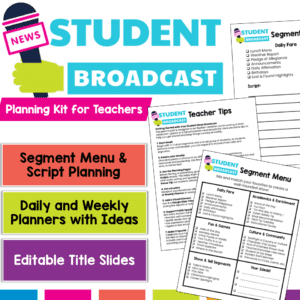
Empower your students to become confident communicators and classroom leaders with this Student News Broadcast Kit! Perfect for morning announcements, classroom news segments, or weekly wrap-ups, this resource gives students everything they need to plan, script, and deliver engaging broadcasts — all while practicing speaking and listening skills aligned with ELA standards.
$50.00Original price was: $50.00.$25.00Current price is: $25.00.
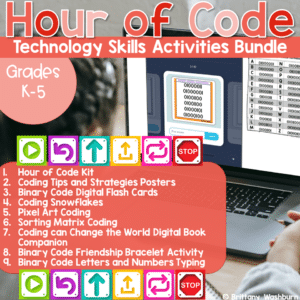
Hour of Code is always around December 9th to celebrate the birthday of Grace Hopper, a computer scientist who is credited with programming one of the first computers. Now we celebrate with a dedicated Computer Science Week during which we challenge students to explore coding concepts and practice for at least an hour. This is a bundle of printable and digital resources and decor that can be used for Computer Science Week or any time of year during your Coding unit.
$85.50Original price was: $85.50.$65.00Current price is: $65.00.
2 sets of Sub plans for the computer lab that include both printable and digital options for grades k-5. Comes with a guide (the bonus download) to show how you could use the activities across the grade levels. Many of the activities can be used multiple times and for multiple grade levels.