

✅ Shop with Confidence
- 🔒 Secure Checkout – Your payment is safe and protected.
- ⭐ Quality Guaranteed – Store credit refunds if something isn’t right.
- 🎉 Earn Rewards – Get points for every dollar spent & redeem as store credit!
👉 Add to Cart and start using this resource today
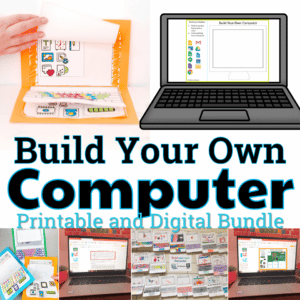
Build Your Own Computer Paper and Digital Bundle
Original price was: $7.50.$6.00Current price is: $6.00.
Both my Best Selling paper Build Your Own Computer and the paperless Digital Build Your Own Computer in one bundle!
Build Your Own Computer Paper and Digital Bundle
Original price was: $7.50.$6.00Current price is: $6.00.
Description
Both my Best Selling paper Build Your Own Computer and the paperless Digital Build Your Own Computer in one bundle!
Please take a look at each individual resource to see what is included:
PAPER BYO COMPUTER:
Your students are going to love learning about the parts of a computer while building their own on paper! These little laptops turn out so adorable you can’t resist smiling when you see the finished products.
In addition to the lift-the-flaps laptop, there is a matching page with definitions of the computer parts for a little added academics.
Use the included pictures to guide you through putting the computer together, but know that it can also be totally customized to meet your needs. You can make it as simple (a coloring activity) or as complicated (learn and label the computer parts) as you need it to be.
Table of Contents:
-1-4 Instructions
-5-6 Options for the laptop frame
-8-13 Options for the keyboard (blank or filled in, windows, chromebook, or mac layout)
-15-17 Icons pages (print the option that works best for you)
-18-19 Matching activity and answer key
DIGITAL BYO COMPUTER:
Students put together a digital computer in 4 click and drag activities. They learn how to put icons on a desktop, where the hardware components go inside of a computer, they label the browser icons, and they put a keyboard together. There are differentiated options to meet the needs of your students.
This activity is provided in PowerPoint. You can upload it into your Google Drive and it will open with Slides.
ISTE Standards Addressed:
Strand: Empowered Learner
Standard: 1.c. use technology to seek feedback that informs and improves their practice and to demonstrate their learning in a variety of ways.
I Can Statements:
I can use a mouse, trackpad, or touchscreen
I can navigate a computer or mobile device using icons
Contents:
- Desktop Icons
- Computer Hardware
- Browser Icons Labeling
- Keyboard layout
Connect with other Technology Teachers:
If you’re interested in connecting with other technology teachers, check out the Technology Teacher Talk Group on Facebook.
Connect with me on social media!
You must be logged in to post a review.
Related Products
-

15 Word Processing Modules Bundle
Original price was: $15.00.$12.00Current price is: $12.00. -
Algorithm Activities
$4.00 -
April Themed Multiplication and Division Practice DIGITAL Mystery Pictures
Original price was: $5.00.$3.00Current price is: $3.00. -

Christmas Coding Digital Interactive Activities
$4.00




You didn’t become a tech teacher to spend your weekends building lessons from scratch. I’m Brittany, a technology curriculum specialist with 1,000+ ISTE-aligned resources designed specifically for K–8 computer lab teachers.
My ready-made digital and printable resources cover everything from digital citizenship and coding fundamentals to multimedia creation and computer essentials, so your planning is handled and your students stay engaged.
Every resource is built to align with ISTE Standards, save you time, and actually work in a computer lab setting, because I’ve taught in one myself.
Browse my bestsellers, or explore by grade level or topic to find exactly what you need.
Reviews
There are no reviews yet.