


✅ Shop with Confidence
- 🔒 Secure Checkout – Your payment is safe and protected.
- ⭐ Quality Guaranteed – Store credit refunds if something isn’t right.
- 🎉 Earn Rewards – Get points for every dollar spent & redeem as store credit!
👉 Add to Cart and start using this resource today
Email Lesson for Elementary Students
$3.00
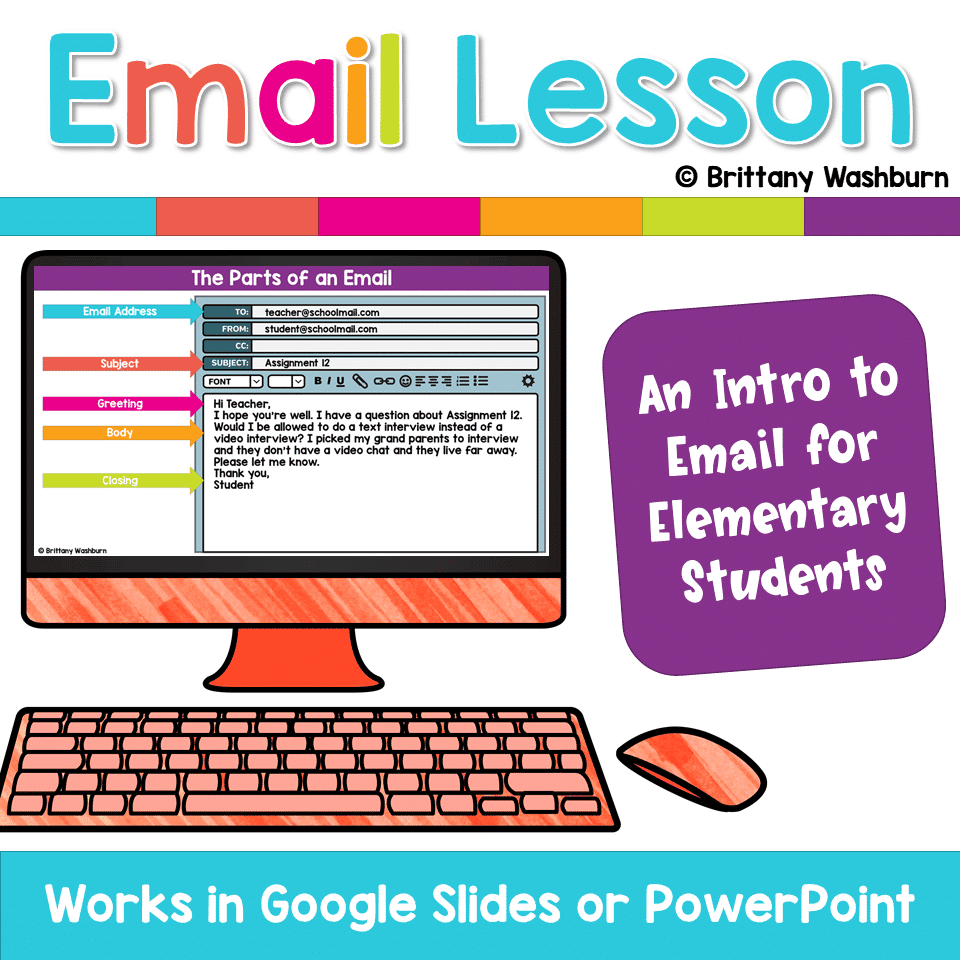
Students need help understanding all of the components and expectations for sending emails. These slides and activities are designed to help. If students are completely new to email then they will need to know some basics before being expected to do it independently.
Email Lesson for Elementary Students
$3.00
Description
Students need help understanding all of the components and expectations for sending emails. These slides and activities are designed to help. If students are completely new to email then they will need to know some basics before being expected to do it independently.
These slides provide the background knowledge needed as well as help students understand what is expected of them. To add engagement and context, email is compared to text messages.
The slides also provide an opportunity to practice drag and drop as well as typing skills.
STANDARDS ADDRESSED
Strand: Creative Communicator
Standard: 6. a. choose the appropriate platforms and tools for meeting the desired objectives of their creation or communication.
I Can Statements:
I can use a digital tool to write an email.
Strand: Empowered Learner
Standard: 1.d. understand the fundamental concepts of technology operations, demonstrate the ability to choose, use and troubleshoot current technologies and are able to transfer their knowledge to explore emerging technologies.
I Can Statements:
I can learn a new technology tool by exploring it.
I can type efficiently.
Product Terms:
Copyright © Brittany Washburn. Purchasing this file entitles you to ONE classroom use. You may use this with multiple classes but may not share with any other teachers. Copying for more than one teacher, classroom, department, school, or school system is prohibited. This product may not be distributed or displayed digitally for public view. Failure to comply is a copyright infringement and a violation of the Digital Millennium Copyright Act (DMCA). Clipart and elements found in this PDF are copyrighted and cannot be extracted and used outside of this file without permission or license. If multiple licenses are needed for use my more than one teacher or in more than one computer lab, additional licenses are discounted.
If you’re interested in connecting with other technology teachers, check out the Technology Teacher Tribe Group on Facebook.
Connect with me on social media!
Additional information
| Resource Type | Digital Activity, Lesson/Unit |
|---|---|
| Format | Google Apps, PDF |
| Topic | Digital Citizenship & Internet Safety |
272 reviews for Email Lesson for Elementary Students
You must be logged in to post a review.
What teachers said on TPT
Rated 4.8 out of 5 by 272 teachers on Teachers Pay Teachers.
“This resources was SUPER helpful and relevant for my students. We went over this lesson before starting an email "pen pal" program with a neighboring school and this was so clear and helped the students get practice on how to curate an email and learn the parts of an email before beginning!”
— Emily J., TPT review
“What an awesome resource to teach students all about email. I used this resource last year with my 5th graders. I loved it so much that this year I will use it with my 4th and 5th grade students. If you are thinking about using this resource.....I promise that you will not regret it!”
— Valentina J., TPT review
“This is an amazing resource! I use this for 4th-8th every year and I can tailor it to the experience of using emails with the grade levels. This is so helpful and I have a lot of fun teaching this lesson. Thank you!”
— The Tech Clubhouse, TPT review
Related Products
-

4 Seasons Graphic Design Lessons and Activities Bundle
Original price was: $12.00.$9.60Current price is: $9.60. -
4th Grade Software Lessons Weeks 1-12
$12.00 -
5th Grade ELA Standards Digital Resource Library BUNDLE
Original price was: $27.20.$24.48Current price is: $24.48. -
5th Grade Language Standards Digital Resource Library
Original price was: $16.00.$14.40Current price is: $14.40.




You didn’t become a tech teacher to spend your weekends building lessons from scratch. I’m Brittany, a technology curriculum specialist with 1,000+ ISTE-aligned resources designed specifically for K–8 computer lab teachers.
My ready-made digital and printable resources cover everything from digital citizenship and coding fundamentals to multimedia creation and computer essentials, so your planning is handled and your students stay engaged.
Every resource is built to align with ISTE Standards, save you time, and actually work in a computer lab setting, because I’ve taught in one myself.
Browse my bestsellers, or explore by grade level or topic to find exactly what you need.

Janathia Crane –
Verified TPT reviewGreat Resource!
The Quack Pack Classroom –
Verified TPT reviewGreat activity for my 5th graders during distance learning!
Lynzey B. –
Verified TPT reviewThis is a great resource! The lesson is easy to understand and implement and was great for differentiation with my entire grade 4/5 class. Students enjoyed the lesson and it was very informative. Thank you!
Photojennic Teaching Mama –
Verified TPT reviewLove this email lesson! Plain and simple to use and teach!
Angela Couch –
Verified TPT reviewThis was a very helpful resource!
Sheila B. –
Verified TPT reviewBrittany has thought of eveything. This is a good intro, or review for your email lesson. There is practice in typing and clicking and dragging.
Heather G. –
Verified TPT reviewThis is a wonderful lesson to explain the differences between e-mail and other forms of digital communication to younger learners!
Kim F. –
Verified TPT reviewMy kids and I started using this towards the end of the school year. It was useful. They found it informative, fun and easy to maneuver through while learning. Can’t wait to use it again.
Tiffany P. –
Verified TPT reviewMy students really liked this activity and were engaged the entire time.
Karissa N. –
Verified TPT reviewGreat lesson for teaching how to write emails, can’t wait to use it again this year!
Summer S. –
Verified TPT reviewMy students loved learning how to properly write emails using this resource. They especially enjoyed learning the difference between texting and a proper email.
Kimberly D. –
Verified TPT reviewVery engaging activity. Students loved learning about emails and sending an email to their favorite teacher.
Jamie G. –
Verified TPT reviewMy students really enjoyed this resource. I believe it will help them in the future writing emails.
David B. –
Verified TPT reviewA great help in teaching email concepts to my 5th graders
MunozSuperLearners –
Verified TPT reviewFun activity to review the basics of email.
Quest for Learning –
Verified TPT reviewI loved this resource! The skills they learn are beneficial for them.
Nicole F. –
Verified TPT reviewStudents in my district get their email access in 3rd grade. I was so pleased with how helpful and easy this resource was to use to help teach them the “Dos” and “Don’ts” of emailing. Thank you for sharing!
Sassy 2nd grade thing –
Verified TPT reviewMy students did seem to struggle at first but after a few days of practice they were successful.
Alissa B. –
Verified TPT reviewI used this with my summer school students and they loved it. Thanks!
North Texas Kids Outside –
Verified TPT reviewAfter cringing at the emails we received from students when schools closed in 2020, this resource was so helpful to teach email ettiquette. Thank you for creating this so I could get us going quickly!