


✅ Shop with Confidence
- 🔒 Secure Checkout – Your payment is safe and protected.
- ⭐ Quality Guaranteed – Store credit refunds if something isn’t right.
- 🎉 Earn Rewards – Get points for every dollar spent & redeem as store credit!
👉 Add to Cart and start using this resource today
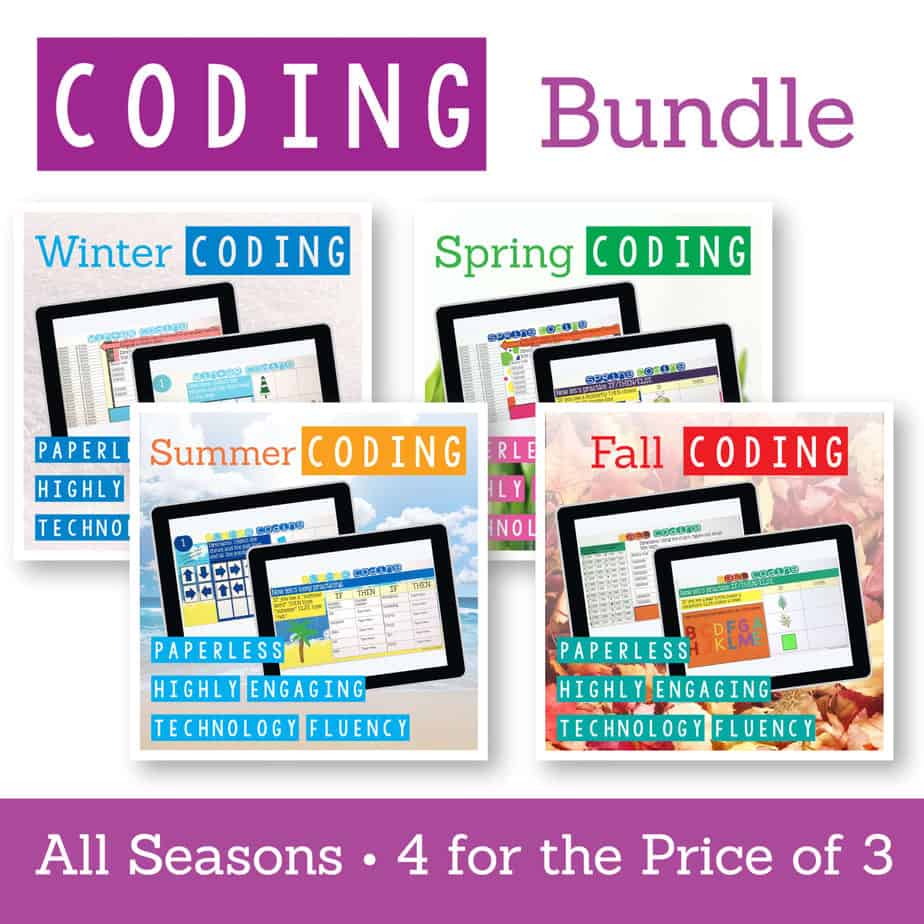
Coding Digital Interactive Activities All Seasons BUNDLE
Original price was: $16.00.$12.80Current price is: $12.80.
These Coding Activities are perfect for your grades 2-5 students. These are fully digital and can be used through Google Slides or PowerPoint. Let your students learn about computer languages in a fun and engaging way. These activities are independent click and go lessons on binary, coding, and problem solving. Perfect for the ISTE standard Computational Thinking. They would even be great for your STEM time in class or your Maker Space during the Hour of Code!
Coding Digital Interactive Activities All Seasons BUNDLE
Original price was: $16.00.$12.80Current price is: $12.80.
Description
These Coding Activities are perfect for your grades 2-5 students. These are fully digital and can be used through Google Slides or PowerPoint. Let your students learn about computer languages in a fun and engaging way. These activities are independent click and go lessons on binary, coding, and problem solving. Perfect for the ISTE standard Computational Thinking. They would even be great for your STEM time in class or your Maker Space during the Hour of Code!
BUNDLE of All 4 Seasons of Coding Digital Activities
What resources are included?
- Winter Coding
- Spring Coding
- Summer Coding
- Fall Coding
*If you have any questions about this type of resource, please ask before purchasing
What you will need
-iPads, laptops, or desktop computers with access to Google Slides or PowerPoint
How does it work?
With this resource you will receive a link to a Google Slides files to be shared with your students in Google Classroom or downloaded and shared as an interactive PowerPoint.
**BENEFITS OF GOOGLE CLASSROOM** ♥ PAPERLESS! ♥ INTEGRATE TECHNOLOGY INTO THE CLASSROOM! ♥ IMPROVE STUDENT COMPUTER SKILLS! ♥ INCREASE STUDENT ENGAGEMENT! ♥ ACCESS MATERIALS ANYWHERE!
Do you have a Google Classroom? Are you looking for digital ways to incorporate common core skills and make your students more adept at utilizing technology in their daily learning? If so, then this is the product for you! #tptdigital
Don’t have Google accounts yet? No problem! Students can still access this presentation if you set it to be “Anyone with the link can edit”. They can add text, just not images. You would have to create a separate presentation for each student and supply them with the url.
This product comes as a link First, make sure you are signed into your Google account. Double click the link and you will be prompted to “Make a Copy”. Rename the file whatever you would like. It will be sent directly to your drive! Disperse to your students via Google Classroom, Google Drive Shared folder, your Learning Platform, etc..
Copyright Brittany Washburn. All rights reserved by author. This product is to be used by the original downloader only. Copying for more than one teacher, classroom, department, school, or school system is prohibited. This product may not be distributed or displayed digitally for public view. Failure to comply is a copyright infringement and a violation of the Digital Millennium Copyright Act (DMCA). Clipart and elements found in this file are copyrighted and cannot be extracted and used outside of this file without permission or license. Intended for classroom and personal use ONLY. See product file for clip art and font credits.
Teachers, use a Purchase Order to buy these lessons.
If you’re interested in connecting with other technology teachers, check out the Technology Teacher Talk Group on Facebook.
Connect with me on social media!
Additional information
| Resource Type | Bundle, Digital Activity |
|---|---|
| Format | Google Apps |
| Topic | Coding & Computer Science |
245 reviews for Coding Digital Interactive Activities All Seasons BUNDLE
You must be logged in to post a review.
What teachers said on TPT
Rated 4.8 out of 5 by 244 teachers on Teachers Pay Teachers.
“Another way for students to learn coding. I try to switch it up each year to reteach some things (especially since some students move in with no experience with coding). This is just a different way to do it. It is so easy to use.”
— Robin M., TPT review
“One of my higher level learners love coding and I have been looking for challenge work to give her. This is the first assignment that I have seen her really taking her time and not breezing through! It is the perfect challenge work for her”
— Colleen M., TPT review
“Love all your resources. I’m going to use the sumner one at our camp this year. The kids are going to be so excited. Thank you for another great resource!”
— Kelly M., TPT review
Related Products
-

Full Year Timely Tech All in One
Original price was: $198.00.$158.40Current price is: $158.40. -

5th Grade ELA Standards Digital Resource Library BUNDLE
Original price was: $27.20.$24.48Current price is: $24.48. -
5th Grade Language Standards Digital Resource Library
Original price was: $16.00.$14.40Current price is: $14.40. -
5th Grade Reading Standards Digital Resource Library
Original price was: $16.00.$12.80Current price is: $12.80.




You didn’t become a tech teacher to spend your weekends building lessons from scratch. I’m Brittany, a technology curriculum specialist with 1,000+ ISTE-aligned resources designed specifically for K–8 computer lab teachers.
My ready-made digital and printable resources cover everything from digital citizenship and coding fundamentals to multimedia creation and computer essentials, so your planning is handled and your students stay engaged.
Every resource is built to align with ISTE Standards, save you time, and actually work in a computer lab setting, because I’ve taught in one myself.
Browse my bestsellers, or explore by grade level or topic to find exactly what you need.

Techie4Life –
Verified TPT reviewThese are SO much fun for the students!! They love it and I love how they are learning coding without realizing it!
Pamela H. –
Verified TPT reviewThanks for sharing! The language is easy for students to understand.
Melissa M. –
Verified TPT reviewThank you
Melissa E. –
Verified TPT reviewUsed this resource with a 5th grade required coding course. The students found it engaging and fun.
Classroom Capers AU –
Verified TPT reviewMore Love
Marie R. –
Verified TPT reviewGreat resource, very eye catching and kept students engaged.
Amanda S. –
Verified TPT reviewGreat resources. I use them as a center in my 3rd grade classroom
Colleen C. –
Verified TPT reviewThis is a great resource.
Sharon A. –
Verified TPT reviewCan’t wait to use it
Patty M. –
Verified TPT reviewI am using them as centers in the library. They aren’t as popular as the online or robotics programming, but it makes them think through the steps.
Tammy W. –
Verified TPT reviewThank you!
Kimberly D. –
Verified TPT reviewGreat way to practice coding all year round!
Ashley L. –
Verified TPT reviewCan’t wait to use this after fall break with 2nd grade.
Holly S. –
Verified TPT reviewGreat Resource!
Kim H. –
Verified TPT reviewCan’t wait to use this with the kids!
Andres R. –
Verified TPT reviewContent repetitive, expected much more!
Amanda G. –
Verified TPT reviewLots of resources to use in my K4-5th computer class –
Dominique Melvin –
Verified TPT reviewGreat!
Panda Pirate Teacher –
Verified TPT reviewThis will be a great introduction or early finisher. Thanks!
Kathleen Mendoza –
Verified TPT reviewEasy to follow coding experiences.