


✅ Shop with Confidence
- 🔒 Secure Checkout – Your payment is safe and protected.
- ⭐ Quality Guaranteed – Store credit refunds if something isn’t right.
- 🎉 Earn Rewards – Get points for every dollar spent & redeem as store credit!
👉 Add to Cart and start using this resource today
Halloween Theme Graphic Design Lesson and Activity
$3.00
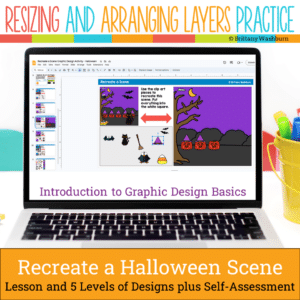
Even our youngest learners can master graphic design basics with digital design activities like this Recreate a Halloween Scene challenge. Students will drag the provided clip art pieces into the work area and then resize and layer the pieces until it looks exactly like the model. I’ve provided 5 challenges that are increasingly more difficult and require more tech skills and perseverance.
Halloween Theme Graphic Design Lesson and Activity
$3.00
Description
-
Google Slides (or download as PowerPoint)
-
Background and Clip Art Graphics Included
-
5 Levels of Challenge
-
Optional Slide for students to design their own Halloween Scene
-
Self-Assessment Questions
-
Empowered Learner: 1c – Students use technology to seek feedback that informs and improves their practice.
-
Computational Thinker: 5c – Students break problems into component parts.
-
Creative Communicator: 6c – Students communicate complex ideas clearly and effectively by using a variety of digital objects.
-
ALIGNMENT
-
FOCAL POINT
-
NEGATIVE SPACE
-
ASPECT RATIO
-
MARGINS
-
SCALE
-
TRIM
-
CROPPING
-
Introduction to Graphic Design Basics
-
How to resize clip art
-
How to arrange layers in Google Slides and in PowerPoint
-
5 slides of design challenges that get progressively more difficult
-
Blank slide with the clip art so they can make their own
-
Self-assessment
Additional information
| Season / Holiday | Halloween |
|---|---|
| Topic | Digital Art & Animation |
| Resource Type | Lesson/Unit |
| Works with | Google Slides, PowerPoint |
| Device needed | On a device |
| Made for | Students |
22 reviews for Halloween Theme Graphic Design Lesson and Activity
You must be logged in to post a review.
What teachers said on TPT
Rated 4.9 out of 5 by 22 teachers on Teachers Pay Teachers.
“My 4th and 5th grade technology students loved this resource, they were so engaged and asked to do more when they finished. I loved that it was a great way to teach so many things on Google Slides.”
— Stacey B., TPT review
“My students LOVED this project and were so engaged with completing it! They loved that it centered around Halloween and that they were able to design and create their own scene! Thank you!”
— sherri M., TPT review
“Loved using this Halloween project to work on layering and duplicating with my students. Several of them asked to work on it again during free choice time the next few weeks!”
— Michelle M., TPT review
Related Products
-

Full Year Timely Tech All in One
Original price was: $198.00.$158.40Current price is: $158.40. -

5th Grade Language Standards Digital Resource Library
Original price was: $16.00.$14.40Current price is: $14.40. -
5th Grade Reading Standards Digital Resource Library
Original price was: $16.00.$12.80Current price is: $12.80. -

Adventures in the Internet Digital Book Companion – Grades 3-5
$3.00



You didn’t become a tech teacher to spend your weekends building lessons from scratch. I’m Brittany, a technology curriculum specialist with 1,000+ ISTE-aligned resources designed specifically for K–8 computer lab teachers.
My ready-made digital and printable resources cover everything from digital citizenship and coding fundamentals to multimedia creation and computer essentials, so your planning is handled and your students stay engaged.
Every resource is built to align with ISTE Standards, save you time, and actually work in a computer lab setting, because I’ve taught in one myself.
Browse my bestsellers, or explore by grade level or topic to find exactly what you need.
Tiffany S. –
Verified TPT reviewGreat resource
This was a fun and engaging resource for my fifth grade student
Lauren S. –
Verified TPT reviewGreat Activity!
I love the Graphic Design Basic series! I use as an introduction and review for my 4th and 5th graders. The “create your own slide” is great for early finishers [even my 6th graders!] or as part of a sub lesson.
Graciela A. –
Verified TPT reviewMy students LOVE these!
I love having the kids work on “design” skills and elements with these holiday themed resources. I have several of them.
Emily D. –
Verified TPT reviewGreat lesson! It was easy to follow, engaging, and my students really enjoyed it. Great resource!
Great lesson! It was easy to follow, engaging, and my students really enjoyed it. Great resource!
Debbie B. –
Verified TPT reviewgreat product
This was a great resource. I would buy from this seller in the future.
Jamie P. –
Verified TPT reviewMy students love using this resource to help them practice resizing objects, copy and paste, and rotating.
Jackie M R. –
Verified TPT reviewMy 5th grade students loved this activity last year. It was an awesome activity that allowed students to create their own designs. I liked it from a technology point of view because they had to resize pictures and layer them correctly to make the pictures look right. Students were engaged and enjoyed doing this. I think I could have even done this with 4th grade, but I only did it with 5th. Thank you, Brittany, for sharing this resource!
Kathryn A. –
Verified TPT reviewMy students enjoyed using this resource. Very engaging
Dawne G. –
Verified TPT reviewI thought this was really cute! I gave the students too many activities to choose from. More would have done this activity
Tech Fun With Lindsey –
Verified TPT reviewGreat way to learn graphic design elements and to celebrate the holiday.
Prepped and Polished Teaching –
Verified TPT reviewMy students really enjoyed this. I plan to use it again next year.
Michelle M. –
Verified TPT reviewLoved using this Halloween project to work on layering and duplicating with my students. Several of them asked to work on it again during free choice time the next few weeks!
Cathy N. –
Verified TPT reviewMy students loved this and really improved their tech skills! Lots of slides here, we didn’t get to them all. I will use this for years to come.
Samantha W. –
Verified TPT reviewMy students loved this! Very engaging resource and really helped them develop their formatting skills in Slides. Thanks!
Roxanne P. –
Verified TPT reviewLoved using this to get my students thinking about graphic design and making things aesthetically pleasing.
But Make It Tech –
Verified TPT reviewMy students really loved this in my Technology classes! Little to no prep too!
Stacey B. –
Verified TPT reviewMy 4th and 5th grade technology students loved this resource, they were so engaged and asked to do more when they finished. I loved that it was a great way to teach so many things on Google Slides.
Molli T. –
Verified TPT reviewMy students loved using this product. It helped them so much with learning more about graphic design.
Tasha Hollingsworth –
Verified TPT reviewMy students used this as one of their choices after they have their assignments and goals completed.
sherri M. –
Verified TPT reviewMy students LOVED this project and were so engaged with completing it! They loved that it centered around Halloween and that they were able to design and create their own scene! Thank you!