Prezi

When we think about creating a presentation, the first thing that pops up in our mind is Microsoft PowerPoint. Learning must be engaging, fun and interesting for kids. But a simple presentation on PowerPoint can be a bit boring. Prezi is a presentation software that can be used to create interesting presentations. Ideas are presented with the help of a zooming interface on a virtual canvas. It allows you to connect with your audience and increase the engagement and collaboration. As you create an interesting presentation, your presentation will also become memorable and eye-catching for your audience. Currently, more than 85 million people are users of Prezi. Prezi is different from other presentation tools because instead of using an approach based on slides, Prezi uses an approach which is based on canvas.

Here is how Prezi works:
- First, create an account. For this purpose, get yourself registered on Prezi.com. You can download the Prezi on your iPad or use it on your desktop.

2. The next step is to start creating your presentation. For this, click on “New Prezi” button and then choose the template of your presentation. You can use any photo as your background canvas. It can be an image that is saved on your computer and it can also be a template which is available on the website for free.

3. Once you have selected your template, you will get access to Prezi editor.
4. Create text fields so that you can easily zoom in and zoom out.
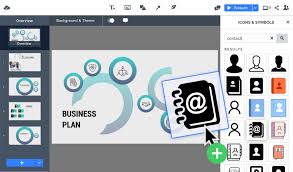
5. You can personalize the text of your presentation in whatever way you want. Choose the size and color of your font, rotate the text if you want. You can also add pictures, sound effects, videos etc. to your presentation. In short, this step is all about showing your creativity.
6. The next step is to edit the zooming path of your presentation. You can do it from the menu appearing on the left-hand side of your presentation.

7. Save your presentation. You can also export it to other sources.

Alignment with the iTECH Model
- Inspire: Introduce Prezi by highlighting its innovative presentation approach, moving away from linear slides to a more dynamic, canvas-style format. Emphasize how Prezi can make learning more engaging and memorable through its unique visual storytelling capabilities.
- Try: Guide students in creating an introductory Prezi presentation. Start with a simple topic, like introducing a vocabulary word or a concept from a recent lesson. Show them how to zoom in on different parts of the canvas and how to add images and text.
- Expand: Encourage students to explore more advanced features of Prezi, such as using different templates, adding animations, and incorporating multimedia elements. Challenge students to create a Prezi presentation that explores a more complex topic, like a research project or a book report.
- Create: Assign a creative project where students use Prezi to present a topic of their choice. This could involve a detailed study of a subject, a personal narrative, or an artistic expression. Encourage students to think about the layout of their canvas and how to guide the audience visually through their presentation.
- Huddle: Organize a session where students present their Prezi creations to the class. Facilitate a discussion on the effectiveness of their presentations, focusing on the visual impact, the flow of information, and audience engagement.

Prezi is increasingly becoming popular among teachers and students because of its user-friendly interface and unique features. Here is how you can use it with your elementary students:
For vocabulary
Prezi can be used to enhance the vocabulary of students. To do this, ask your students to memorize 10 new words and then present them by using a Prezi. Here is how it can be done:
- Type the word in Prezi. E.g. Carnivore
- Type the definition of that word and zoom into this definition.
- Add the picture and zoom into that picture. E.g. a picture of a lion.
- Present in front of the class.
Knowledge of the local community
Prezi can be used to enhance the knowledge of students about their local community. Here is how they can do it:
- Identify the jobs of 5 people in their community. E.g. Principal.
- Write the names of those people in Prezi.
- Write their occupations and zoom into
- Write a few lines about how these people and helping the community and zoom into
- Present in front of the class.
Tips for Effective Implementation
1. Storyboarding: Encourage students to plan their Prezi presentation like a story, thinking about the flow and transition of information.
2. Visual Design: Teach principles of good visual design, such as color theory, balance, and how to effectively use images and text.
3. Collaborative Learning: Promote collaboration by having students work in pairs or small groups to create a Prezi presentation. Encourage them to share ideas and responsibilities.
Role of Educators
Educators can guide students in mastering Prezi, ensuring they understand how to use its features to create impactful presentations. Provide feedback on presentation design, content clarity, and engagement strategies.
Prezi offers a modern, creative approach to presentations. It moves beyond traditional slides to a more engaging, canvas-based experience. By integrating Prezi with the iTECH Model, you can foster creativity, visual storytelling skills, and effective communication in your students. Prezi’s ability to captivate and engage makes it a valuable tool for enhancing learning experiences in the classroom.
Click here for a presentation you can use with your staff. It is completely editable so feel free to make any changes you need.