Nearpod

Nearpod is an awesome lesson integration program. You can use standards-based pre-made lessons or create your own. It integrates with Google classrooms. You can easily upload, PDF documents, Google Slides, Powerpoints, and other documents to have your lessons ready to go in an integrated platform.
Nearpod also has an augmented reality (AR) feature allowing you to take a field trip virtually anywhere around the world.
You have the option to create a student-paced lesson where students work at their own pace. You can also use a live lesson format where the students follow along with the teacher in real-time. Teachers get real-time feedback on class performance.
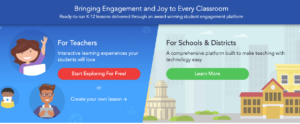

- Create a Nearpod teacher account.
- Download the Nearpod app on student devices.

3. Create a lesson by uploading your own documents or choosing a pre-made lesson.
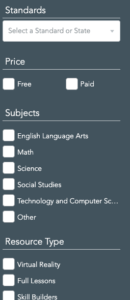
4. If you choose a pre-made lesson you can filter to suit your needs.

5. Save the lesson to your library.
6. Decide whether you want the lesson to be student-paced or live by choosing the correct option at the bottom of the screen.
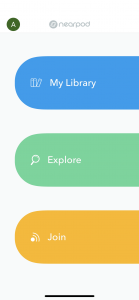

7. Students enter the lesson code on their screen and begin the lesson.
8. Gather assessment data after the students finish the lesson.

Alignment with the iTECH Model
- Inspire: Introduce Nearpod by showcasing its ability to transform traditional lessons into interactive, multimedia experiences. Highlight the potential of AR to take students on virtual field trips and enhance their understanding of the world.
- Try: Start with a simple Nearpod lesson in a subject area relevant to your curriculum. Guide students through either a live lesson or a student-paced activity. Encourage students to interact with all elements of the lesson, including quizzes, videos, and AR features.
- Expand: Incorporate more complex and diverse Nearpod lessons into your teaching, spanning various subjects and incorporating different types of multimedia content. Utilize Nearpod’s AR capabilities for deeper exploration, such as a virtual field trip or 3D models related to lesson content.
- Create: Design your own Nearpod lessons tailored to your curriculum needs, integrating various multimedia elements and interactive features. Develop lessons that encourage critical thinking and apply them to real world scenarios to enhance students’ learning experience.
- Huddle: After conducting a Nearpod lesson, engage students in a discussion about their learning experience, insights gained, and any AR explorations. Use Nearpod’s real-time feedback to address areas of misunderstanding or to highlight student achievements.
Nearpod engages students and integrates curriculum. Students don’t actually create anything with Nearpod, but as the teacher, you have the ability to use it in all kinds of ways.
Virtual Field Trip to Zoo
You could teach a lesson about mammals and use Nearpod to take you on a field trip to a zoo. Your kids would be able to see all kinds of mammals. After the field trip, you can use Nearpod’s AR features to show different 3D mammals.
Grammar and Vocabulary
Students could work through a grammar or vocabulary lesson and then take a quiz. Students get immediate feedback on their quiz results, and you can use those results to drive your instruction.
Tips for Effective Implementation
- Blend with Curriculum: Ensure Nearpod lessons are well-integrated with your curriculum, enhancing rather than replacing traditional teaching methods.
- Leverage Interactive Features: Make full use of Nearpod’s interactive features, like quizzes, polls, and drawing tools, to keep students engaged.
- Utilize AR for Immersive Learning: Employ AR features for subjects that benefit from visual and experiential learning, like science, history, or geography.
Role of Educators
Educators can facilitate Nearpod lessons by guiding students through the interactive components and ensuring the technology is used to enhance understanding and engagement. Analyze feedback from Nearpod activities to inform future teaching strategies.
Nearpod offers an innovative way for educators to deliver engaging and interactive lessons that resonate with today’s digital learners. By integrating Nearpod with the iTECH Model, educators can create a dynamic and immersive learning environment that combines traditional teaching with modern technology. Whether through virtual field trips, interactive exercises, or immediate feedback, Nearpod is an invaluable tool for enhancing education in diverse learning environments.
Click here for a presentation you can use with your staff. It is completely editable so feel free to make any changes you need.