Pieces Basic

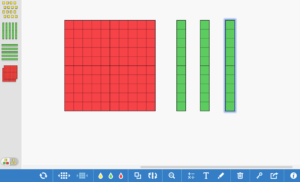
Pieces Basic is an interactive manipulative tool. Students can use it as a web tool or download it as an iPad app. This tool is a great alternative to using typical manipulatives. It helps engage students in hands-on math without actually having to put their hands on manipulatives.
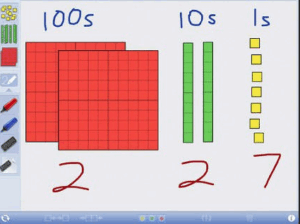
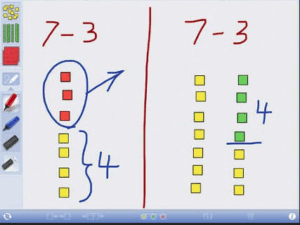
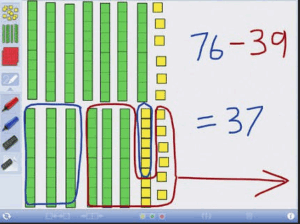
Students can use the base ten blocks to count, design shapes, or make their own word problems, using the drawing tool to write on the screen.

- Go to Edshelf’s Number Pieces Basic.
- Click on “Get this Tool” in the upper right-hand corner of the screen.
- Choose either the website or iPad app option.

4. If you choose the website, you will be directed to the site. If you select the iPad app, you’ll be directed to the app store where you can download the app.
5. Begin clicking on manipulatives and tools along the edges of the screen.

Alignment with the iTECH Model
- Inspire: Introduce Pieces Basic by demonstrating how it transforms traditional math manipulatives into an interactive digital experience. Discuss the importance of visual and hands-on learning in math to spark your students’ interest.
- Try: Guide the class in exploring Pieces Basic, familiarizing them with its features like base ten blocks and the drawing tool. Allow them to experiment with simple tasks such as counting, arranging blocks, or drawing basic shapes.
- Expand: Introduce more complex activities such as creating word problems or designing more intricate shapes and patterns. Teach mathematical concepts like place value, addition, subtraction, and geometry using the tool.
- Create: Assign a project where students use Pieces Basic to create and present a math word problem or a demonstration of a math concept. Encourage creativity in how they use the tool to explain their thought process and solutions.
- Huddle: Have students present their math problems or concepts using Pieces Basic to the class. Facilitate peer feedback and discussion about the different approaches and solutions presented.
Math Presentation
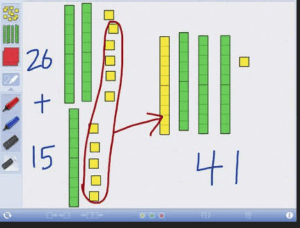
With Pieces Basic, it’s easy to use the manipulatives and drawing tools to create a word problem or a math problem in general. Students could create a word problem and present it to the class as part of the lesson. This would work well for any grade level.
Study Tool
As students work on math problems in class, they can use Pieces Basic to help them with their work. Instead of having a pile of manipulatives, students will be able to use the app or web tool to count out base ten blocks.
Tips for Effective Implementation
- Interactive Learning: Promote Pieces Basic as a tool for interactive and exploratory learning, encouraging students to discover mathematical concepts through manipulation and visualization.
- Integrate with Curriculum: Ensure activities using Pieces Basic are aligned with your math curriculum and learning objectives.
- Foster Problem-Solving Skills: Use Pieces Basic to challenge students with real-world math problems that require critical thinking and problem-solving.
Role of Educators
Educators can facilitate the use of Pieces Basic by guiding students through its functionalities and ensuring its integration into math lessons enhances understanding and engagement. Provide support in using the tool effectively and encourage exploration and discovery.
Pieces Basic offers a novel way to engage students in math learning, combining the tactile experience of manipulatives with the convenience and versatility of digital tools. By integrating Pieces Basic with the iTECH Model, educators can make math lessons more interactive, visually appealing, and understandable. Whether for individual problem-solving, group work, or class presentations, Pieces Basic is a valuable tool for enhancing math education in the digital age.
Click here for a presentation you can use with your staff. It is completely editable so feel free to make any changes you need.